
 MENU

You have an Azure subscription that contains the resources shown in the following table.
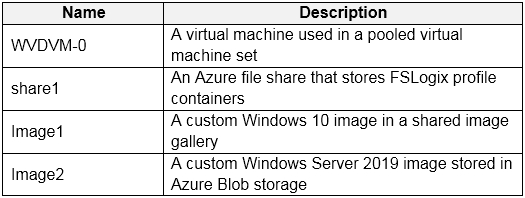
Which resources can you back up by using Azure Backup?
Suggested Answer: A
Get Premium AZ-140 Questions
as Interactive Web-Based Practice Test or PDF
Real Exam Format
Detailed Explanations
Instant Access
Get Your Practice Test
12 comments · newest first
AN
Annelle
12 months ago
I agree, E seems like the best choice here!
MA
Marcelle
1 year ago
Wait, can you really back up images like that? Seems off.
LA
Lavonna
1 year ago
I think it's just WVDVM-0 and share1, so A might be right.
BE
Beckie
1 year ago
Definitely E! All those resources can be backed up.
MI
Micaela
1 year ago
You can back up VMs and Azure file shares with Azure Backup.
PA
Patti
1 year ago
I think all the resources listed can be backed up, but I might be mixing up the capabilities of Azure Backup with another service.
GE
German
1 year ago
I feel like WVDVM-0 is a safe bet for backup, but I can't recall if share1 is supported. This is tricky!
DE
Denna
1 year ago
I remember that Azure Backup can back up VMs, but I'm not sure about the shares. I think I need to double-check that.
TR
Trina
1 year ago
I practiced a similar question where we had to identify resources for backup. I think VMs are definitely included, but I'm not confident about the images.
JO
Johnson
1 year ago
This seems like a straightforward accessibility question. I'll focus on the key terms like "simplified text" and "images/graphs" to determine which disability type is being targeted.
RO
Rosamond
1 year ago
Hmm, I'm not sure about that. Wouldn't using the Developer Console's execute anonymous feature (option B) be a better way to test the trigger without impacting the production data? That seems like a cleaner approach.
JU
Juliann
1 year ago
The key is to remember the ITIL framework for Problem Management. I think the right order is identify and record, classify, investigate and diagnose, raise an RFC, and review the change. So I'll go with option A.