Deal of The Day! Hurry Up, Grab the Special Discount - Save 25% - Ends In 00:00:00 Coupon code: SAVE25

Welcome to Pass4Success

- Free Preparation Discussions

Linux Foundation CKAD Exam - Topic 10 Question 28 Discussion

Actual exam question for Linux Foundation's CKAD exam
Question #: 28
Topic #: 10
[All CKAD Questions]

Refer to Exhibit.

Task:

A Dockerfile has been prepared at -/human-stork/build/Dockerfile

1) Using the prepared Dockerfile, build a container image with the name macque and lag 3.0. You may install and use the tool of your choice.
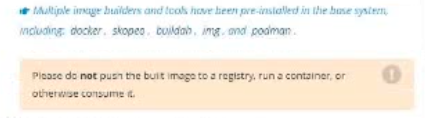
2) Using the tool of your choice export the built container image in OC-format and store it at -/human stork/macque 3.0 tar

Show Suggested Answer Hide Answer
Suggested Answer: A

Contribute your Thoughts:

0/2000 characters
Frank
4 months ago
Are you sure it has to be stored as a tar file? Sounds odd.
upvoted 0 times
...
Matthew
4 months ago
Totally agree, Docker is the way to go for this task!
upvoted 0 times
...
Franklyn
4 months ago
Wait, we have to export it in OC-format? That’s new to me!
upvoted 0 times
...
Van
4 months ago
I think using Docker CLI is the easiest way for this.
upvoted 0 times
...
Toi
5 months ago
Just built the image named macque with tag 3.0!
upvoted 0 times
...
Edda
5 months ago
I practiced building images before, but I’m a bit confused about the difference between tagging and naming in this context.
upvoted 0 times
...
Audria
5 months ago
I feel confident about using the Docker CLI, but I might mix up the paths for saving the exported image.
upvoted 0 times
...
Laticia
5 months ago
I think I did a similar question where we had to export an image, but I can't recall if it was in OC-format or something else.
upvoted 0 times
...
Ira
5 months ago
I remember practicing building images with Dockerfiles, but I'm not entirely sure about the exact command syntax for tagging.
upvoted 0 times
...
Wava
5 months ago
Ah, I see the key details now. I'll need to use the Docker CLI to build the image from the provided Dockerfile, making sure to tag it as "macque:3.0". Then I'll export the image to the specified location using the Docker save command.
upvoted 0 times
...
Alex
5 months ago
No problem, I've done this kind of task before. I'll just run "docker build -t macque:3.0 -f -/human-stork/build/Dockerfile ." to build the image, and then "docker save macque:3.0 -o -/human stork/macque 3.0 tar" to export it.
upvoted 0 times
...
Jennie
5 months ago
Hmm, I'm a bit unsure about the exact commands to use here. I'll need to double-check the Docker documentation to make sure I'm using the right syntax for the build and export steps.
upvoted 0 times
...
Herminia
5 months ago
Okay, this looks straightforward. I'll start by using the Docker CLI to build the image from the provided Dockerfile, making sure to tag it as "macque:3.0". Then I'll use the Docker save command to export the image to the specified location.
upvoted 0 times
...
Rolland
6 months ago
Hmm, this one seems pretty straightforward. I think the answer is D - it's the Developers' plan for the Sprint.
upvoted 0 times
...
Elmira
6 months ago
I think the key here is to stay calm and professional. Matching the customer's attitude and not interrupting them are both solid strategies. I'll have to weigh the options carefully.
upvoted 0 times
...
Roosevelt
6 months ago
I'm a bit confused by the wording of the question. Is it asking which statement is incorrect, or which one is correct? I'll have to read through the options carefully to make sure I understand what they're looking for.
upvoted 0 times
...
Eleonora
6 months ago
I've seen questions like this before. The key is to focus on the core purpose and functionality of the DRM system. I think option C, access control, is the best fit.
upvoted 0 times
...

Save Cancel
