
Free Preparation Discussions
 MENU
MENU
Juniper JN0-637 Exam Questions
- Topic 1: Troubleshooting Security Policies and Security Zones: This topic assesses the skills of networking professionals in troubleshooting and monitoring security policies and zones using tools like logging and tracing.
- Topic 2: Logical Systems and Tenant Systems: This topic of the exam explores the concepts and functionalities of logical systems and tenant systems.
- Topic 3: Layer 2 Security: It covers Layer 2 Security concepts and requires candidates to configure or monitor related scenarios.
- Topic 4: Advanced Network Address Translation (NAT): This section evaluates networking professionals' expertise in advanced NAT functionalities and their ability to manage complex NAT scenarios.
- Topic 5: Advanced IPsec VPNs: Focusing on networking professionals, this part covers advanced IPsec VPN concepts and requires candidates to demonstrate their skills in real-world applications.
- Topic 6: Advanced Policy-Based Routing (APBR): This topic emphasizes on advanced policy-based routing concepts and practical configuration or monitoring tasks.
- Topic 7: Multinode High Availability (HA): In this topic, aspiring networking professionals get knowledge about multinode HA concepts. To pass the exam, candidates must learn to configure or monitor HA systems.
- Topic 8: Automated Threat Mitigation: This topic covers Automated Threat Mitigation concepts and emphasizes implementing and managing threat mitigation strategies.
Free Juniper JN0-637 Exam Actual Questions
Note: Premium Questions for JN0-637 were last updated On Sep. 18, 2026 (see below)
Which two statements are correct about mixed mode? (Choose two.)
Which two statements are correct about the ICL in an active/active mode multinode HA environment? (Choose two.)
Exhibit:
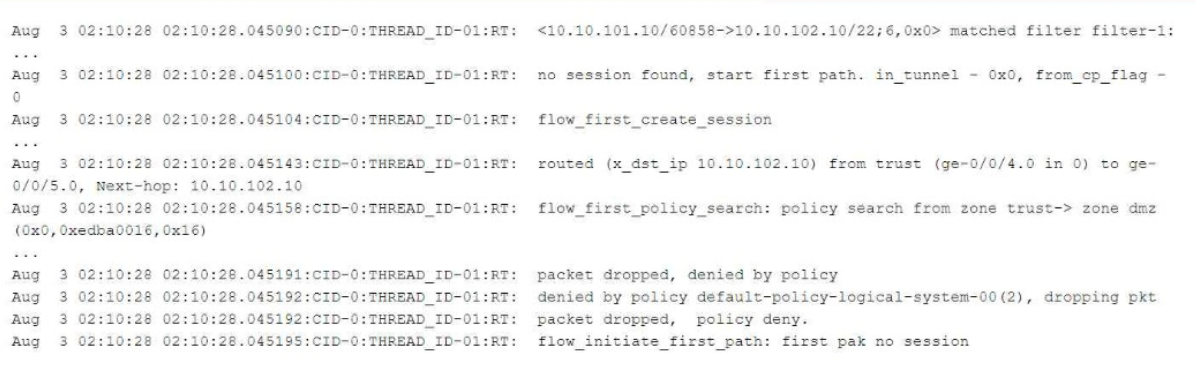
Referring to the flow logs exhibit, which two statements are correct? (Choose two.)
Understanding the Flow Log Output:
From the flow logs in the exhibit, we can observe the following key events:
The session creation was initiated (flow_first_create_session), but the policy search failed (flow_first_policy_search), which implies that no matching policy was found between the zones involved (zone trust-> zone dmz).
The packet was dropped with the reason 'denied by policy.' This shows that the packet was dropped either due to no matching security policy or because the default policy denies the traffic (packet dropped, denied by policy).
The line denied by policy default-policy-logical-system-00(2) indicates that the default security policy is responsible for denying the traffic, confirming that no explicit security policy was configured to allow this traffic.
Explanation of Answer A (Dropped by the default security policy):
The log message clearly states that the packet was dropped by the default security policy (default-policy-logical-system-00). In Junos, when a session is attempted between two zones and no explicit policy exists to allow the traffic, the default policy is to deny the traffic. This is a common behavior in Junos OS when a security policy does not explicitly allow traffic between zones.
Explanation of Answer D (Requires traceoptions flag of basic-datapath):
The information displayed in the log involves session creation, flow policy search, and packet dropping due to policy violations, which are all part of basic packet processing in the data path. This type of information is logged when the traceoptions flag is set to basic-datapath. The basic-datapath traceoption provides detailed information about the forwarding process, including policy lookups and packet drops, which is precisely what we see in the exhibit.
The traceoptions flag host-traffic (Answer C) is incorrect because host-traffic is typically used for traffic destined to or generated from the Junos device itself (e.g., SSH or SNMP traffic to the SRX device), not for traffic passing through the device.
To capture flow processing details like those shown, you need the basic-datapath traceoptions flag, which provides details about packet forwarding and policy evaluation.
Step-by-Step Configuration for Tracing (Basic-Datapath):
Enable flow traceoptions:
To capture detailed information about how traffic is being processed, including policy lookups and flow session creation, enable traceoptions for the flow.
bash
set security flow traceoptions file flow-log
set security flow traceoptions flag basic-datapath
Apply the configuration and commit:
bash
commit
View the logs:
Once enabled, you can check the trace logs for packet flows, policy lookups, and session creation details:
bash
show log flow-log
This log will contain information similar to the exhibit, including session creation attempts and packet drops due to security policy.
Juniper Security Reference:
Default Security Policies: Juniper SRX devices have a default security policy to deny all traffic that is not explicitly allowed by user-defined policies. This is essential for security best practices. Reference: Juniper Networks Documentation on Security Policies.
Traceoptions for Debugging Flows: Using traceoptions is crucial for debugging and understanding how traffic is handled by the SRX, particularly when issues arise from policy misconfigurations or routing. Reference: Juniper Traceoptions.
By using the basic-datapath traceoptions, you can gain insights into how the device processes traffic, including policy lookups, route lookups, and packet drops, as demonstrated in the exhibit.
You have deployed two SRX Series devices in an active/passive multimode HA scenario.
In this scenario, which two statements are correct? (Choose two.)
What is the advantage of using separate st0 logical units for each spoke connection?
- Select Question Types you want
- Set your Desired Pass Percentage
- Allocate Time (Hours : Minutes)
- Create Multiple Practice tests with Limited Questions
- Customer Support
Elizabeth Murphy
3 days agoJoshua Jones
24 days agoEmma Lopez
1 month agoJoshua Morgan
2 months agoGary Rodriguez
2 months agoTiffany Wright
3 months agoJohn Evans
3 months agoChristopher Evans
4 months agoJason Phillips
4 months agoGary Rivera
5 months agoRichard Sanchez
5 months agoDonna Sanchez
5 months agoOlivia Brown
5 months agoRachel Ramirez
5 months agoElizabeth Nelson
5 months agoJeffrey Jackson
5 months agoLisbeth
6 months agoElliot
6 months agoStevie
6 months agoMoira
7 months agoMeghann
7 months agoGenevieve
7 months agoLaila
8 months agoNettie
8 months agoThomasena
8 months agoLenna
8 months agoChauncey
9 months agoSherly
9 months agoMarge
9 months agoReena
9 months agoTelma
10 months agoBenedict
10 months agoArt
10 months agoFreeman
10 months agoDiane
11 months agoLatia
11 months agoSina
11 months agoAngella
11 months agoTambra
12 months agoMitsue
12 months agoWillie
1 year agoNettie
1 year agoDottie
1 year agoJeniffer
1 year agoLeatha
1 year agoGussie
1 year agoAllene
1 year agoLuisa
1 year agoShaniqua
2 years agoLina
2 years agoUna
2 years agoTess
2 years agoTomas
2 years agoEstrella
2 years agoArlene
2 years agoDenise
2 years agoLashawn
2 years agoXochitl
2 years agoMonte
2 years agoMarkus
2 years agoBlair
2 years agoJade
2 years ago