
Free Preparation Discussions
 MENU
MENU
Juniper JN0-352 Exam Questions
- Topic 1: Layer 2 Switching or VLANs: Covers Junos Layer 2 switching fundamentals, VLAN concepts including tagging, native/voice VLANs, and inter-VLAN routing, along with their configuration and troubleshooting.
- Topic 2: Spanning Tree: Covers STP and RSTP concepts, port roles/states, BPDUs, and convergence, along with configuring and troubleshooting these protocols.
- Topic 3: Layer 2 Security: Covers Layer 2 protection features like BPDU/loop/root protection, port security, MACsec, storm control, and Layer 2 firewall filters, along with their configuration and troubleshooting.
- Topic 4: Protocol Independent Routing: Covers static, aggregate, and generated routes, routing instances, load balancing, and filter-based forwarding, along with their configuration and troubleshooting.
- Topic 5: OSPF: Covers OSPF concepts such as the link-state database, packet types, adjacencies, DR/BDR, and LSA types, along with configuring and troubleshooting OSPF.
- Topic 6: IS-IS: Covers IS-IS concepts including the link-state database, PDUs, TLVs, levels/areas, and DIS, along with configuring and troubleshooting IS-IS.
- Topic 7: BGP: Covers BGP operation, message types, attributes, and route selection, along with configuring and troubleshooting BGP groups and peers.
- Topic 8: Tunnels: Covers IP tunneling concepts and applications including GRE and IP-IP, along with configuring and troubleshooting these tunnels.
- Topic 9: High Availability: Covers high-availability features such as LAG, RTG, virtual chassis, GRES, NSR/NSB, BFD, VRRP, and ISSU, along with their configuration and troubleshooting.
Free Juniper JN0-352 Exam Actual Questions
Note: Premium Questions for JN0-352 were last updated On Oct. 21, 2026 (see below)
[Exhibit]
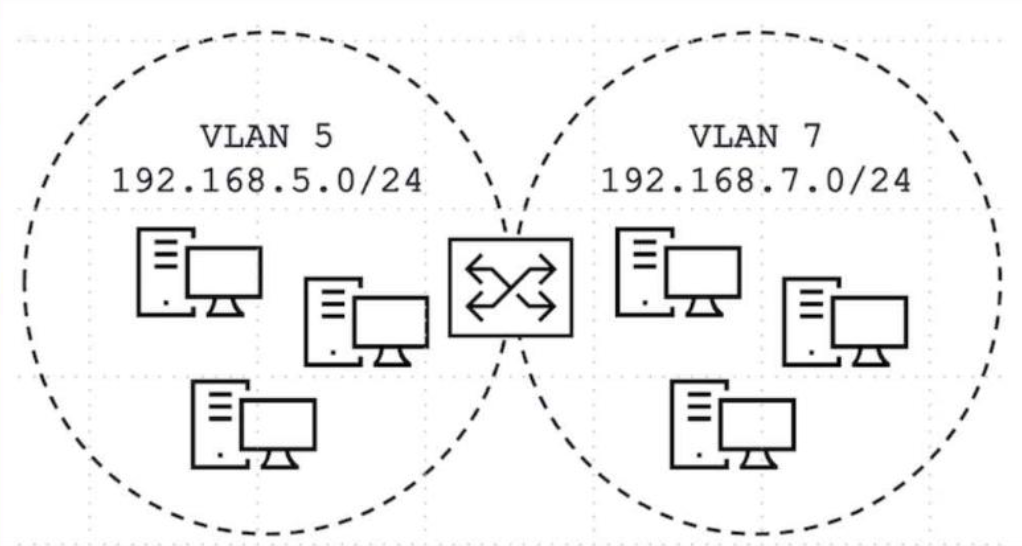
Click the Exhibit button.
Devices on VLAN 5 and VLAN 7 need to communicate with each other.
Referring to the exhibit, what will satisfy this requirement?
VLAN 5 and VLAN 7 are two entirely separate Layer 2 broadcast domains, each with its own distinct IP subnet, and devices in one VLAN can never reach devices in the other through switching alone --- Layer 3 routing between the two subnets is mandatory for any inter-VLAN communication to occur, regardless of how the VLANs are configured at Layer 2. On a single EX Series switch, the correct and standard mechanism for enabling this routing without an external router is to create one integrated routing and bridging (IRB) logical interface for each VLAN, assign each IRB the appropriate gateway IP address for its respective subnet (192.168.5.1 for VLAN 5's irb.5 and 192.168.7.1 for VLAN 7's irb.7, for example), and ensure routing is active on the switch so that traffic arriving at one IRB's gateway address destined for the other VLAN's subnet is routed internally between the two IRB interfaces. Attempting to bind a single family inet interface with two distinct subnet addresses via secondary addressing conflates two separate broadcast domains onto one Layer 3 interface incorrectly and is not how VLAN routing is architected in Junos. Spanning tree exists purely to prevent Layer 2 loops and has no routing function whatsoever, so configuring it cannot enable inter-VLAN reachability. Placing both VLANs on a single trunk with Multiple VLAN Registration Protocol (MVRP) only automates VLAN membership propagation across trunk links; it does not provide any Layer 3 routing capability between the VLANs either. Reference topics: Junos Enterprise Switching -- Routing VLANs, Configuring IRB Interfaces for Inter-VLAN Routing.
You are deploying a Juniper Networks EX Series Switch to connect 24 end devices to VLAN 70, with an uplink interface to a distribution switch that carries VLANs 30, 50, and 70. You need to correctly configure the interface type for the end-device interfaces.
In this scenario, which statement is correct?
Each of the 24 end-device-facing interfaces in this scenario needs to carry traffic for exactly one VLAN, and the end devices themselves are ordinary hosts that neither expect nor generate 802.1Q-tagged frames. This is precisely the definition of an access port in Junos: family ethernet-switching interface-mode is set to access, and a single vlan members statement assigns the port to VLAN 70. Access mode ensures frames egressing toward the host are untagged and any frames received are implicitly treated as belonging to the configured VLAN, which is both simpler to manage and more efficient than trunking, since access ports do not carry the 802.1Q tag overhead nor process VLAN pruning logic relevant only to multi-VLAN links. Trunk mode, by contrast, is reserved for switch-to-switch or switch-to-router links that must simultaneously carry frames for multiple VLANs, such as the uplink toward the distribution switch that transports VLANs 30, 50, and 70 together --- configuring the 24 host-facing ports as trunks (with or without a native VLAN) would be functionally incorrect and operationally wasteful, since end devices have no need to interpret VLAN tags. There is also no such behavior in Junos where VLAN-ID numeric value dictates default port behavior, making the 'no configuration needed' option a distractor with no basis in EX Series switching architecture. Reference topics: Junos Enterprise Switching -- VLANs, Configuring Access and Trunk Port Modes.
What determines the preferred route to a destination in an IS-IS network?
IS-IS is a link-state protocol that, like OSPF, runs Dijkstra's Shortest Path First algorithm independently on each router against its own copy of the synchronized link-state database to compute the best path toward every reachable destination. Each link within the topology carries an administrator-assigned or default metric, and as the SPF algorithm walks the topology graph from the local router outward, it sums the metrics of every link traversed along a candidate path to produce that path's total accumulated cost. Among all possible paths to a given destination prefix, IS-IS always selects and installs the path (or, in the case of equal-cost multipath, the set of paths) with the numerically lowest total accumulated metric, exactly mirroring the 'lowest cost wins' principle shared by essentially all link-state IGPs. A higher accumulated metric value is by definition a less preferred, more costly path, making that option the direct inverse of correct IS-IS behavior. Level 2 proximity to the destination has no independent bearing on path selection beyond however it happens to be reflected in the accumulated metric itself --- IS-IS does not apply a separate rule preferring paths merely for passing near a Level 2 router. Likewise, LSP recency (sequence number or freshness) governs which version of a given LSP is trusted and flooded during database synchronization, ensuring the topology database itself is accurate and loop-free, but it plays no role in the SPF cost comparison once the database is synchronized and consistent. Reference topics: Junos Enterprise Routing -- IS-IS, SPF Calculation and Metric-Based Path Selection.
You have enabled MACsec on two directly connected Ethernet devices but MACsec is not working.
Which two actions will solve this problem? (Choose two.)
MACsec (IEEE 802.1AE) secures a point-to-point Ethernet link independently of how the logical unit above it is configured for VLAN tagging, so neither trunk mode nor access mode has any bearing on whether the MACsec Key Agreement (MKA) protocol can establish a secure channel. What does determine success is the pre-shared key material: when static CAK security mode is used, the Connectivity Association Key (CAK) and the Connectivity Association Key Name (CKN) must be configured identically on both ends of the link. If they do not match, MKA never completes the exchange, no secure channel is created, and all traffic on that interface is dropped rather than merely left unencrypted. Equally important, and frequently overlooked, is that MACsec adds up to 32 bytes of overhead per frame for the security tag (SecTAG) and integrity check value (ICV); Juniper's official guidance is to ensure the difference between the interface's physical MTU and the protocol MTU is large enough to absorb this overhead, or frames will be silently discarded once encryption is active, producing symptoms that look identical to a failed session. Both the CAK/CKN and MTU checks are documented first-line troubleshooting steps for MACsec on EX Series switches. Reference topics: Junos Enterprise Switching -- Layer 2 Security, Configuring and Troubleshooting MACsec on EX Series Switches.
Which IS-IS TLV should be used to advertise information about the router's neighbors and link metrics?
TLV 22, the Extended IS Reachability TLV defined in RFC 5305, is the modern and Junos-preferred mechanism for advertising a router's adjacent neighbors together with the metric associated with each link. It carries the seven-octet system ID and pseudonode number of each neighbor along with a 24-bit wide metric field, and supports an extensible set of sub-TLVs used for traffic-engineering data such as interface and neighbor IP addresses, bandwidth, and administrative groups. The original IS Reachability TLV, TLV 2, defined in the base ISO 10589 standard, carries similar neighbor and metric information but is constrained to a 6-bit narrow metric with a maximum value of 63, which is inadequate for expressing meaningful cost differentiation in modern, high-capacity enterprise and service-provider topologies; consequently, Junos deployments are commonly configured for wide-metrics-only, favoring TLV 22 over the legacy TLV 2 whenever traffic-engineering-capable or simply more granular metric representation is desired. TLV 132, the IP Interface Address TLV, only advertises the IPv4 addresses configured on the originating router's interfaces and carries no neighbor-adjacency or metric information. TLV 129, the Protocols Supported TLV, merely lists which network-layer protocols (such as IPv4 or IPv6) the originating router is capable of routing, and likewise has nothing to do with neighbor reachability or link cost. Reference topics: Junos Enterprise Routing -- IS-IS, Extended IS Reachability and Wide Metrics.
- Select Question Types you want
- Set your Desired Pass Percentage
- Allocate Time (Hours : Minutes)
- Create Multiple Practice tests with Limited Questions
- Customer Support
Gaurav Bhat
1 day agoVikram Chauhan
16 days agoAlejandro Kuznetsov
1 month agoPooja Chopra
2 months agoBao Li
2 months agoPatricia Baker
3 months ago