
Free Preparation Discussions
 MENU
MENU
Juniper JN0-352 Exam Questions
- Topic 1: Layer 2 Switching or VLANs: Covers Junos Layer 2 switching fundamentals, VLAN concepts including tagging, native/voice VLANs, and inter-VLAN routing, along with their configuration and troubleshooting.
- Topic 2: Spanning Tree: Covers STP and RSTP concepts, port roles/states, BPDUs, and convergence, along with configuring and troubleshooting these protocols.
- Topic 3: Layer 2 Security: Covers Layer 2 protection features like BPDU/loop/root protection, port security, MACsec, storm control, and Layer 2 firewall filters, along with their configuration and troubleshooting.
- Topic 4: Protocol Independent Routing: Covers static, aggregate, and generated routes, routing instances, load balancing, and filter-based forwarding, along with their configuration and troubleshooting.
- Topic 5: OSPF: Covers OSPF concepts such as the link-state database, packet types, adjacencies, DR/BDR, and LSA types, along with configuring and troubleshooting OSPF.
- Topic 6: IS-IS: Covers IS-IS concepts including the link-state database, PDUs, TLVs, levels/areas, and DIS, along with configuring and troubleshooting IS-IS.
- Topic 7: BGP: Covers BGP operation, message types, attributes, and route selection, along with configuring and troubleshooting BGP groups and peers.
- Topic 8: Tunnels: Covers IP tunneling concepts and applications including GRE and IP-IP, along with configuring and troubleshooting these tunnels.
- Topic 9: High Availability: Covers high-availability features such as LAG, RTG, virtual chassis, GRES, NSR/NSB, BFD, VRRP, and ISSU, along with their configuration and troubleshooting.
Free Juniper JN0-352 Exam Actual Questions
Note: Premium Questions for JN0-352 were last updated On Aug. 29, 2026 (see below)
You have enabled MACsec on two directly connected Ethernet devices but MACsec is not working.
Which two actions will solve this problem? (Choose two.)
MACsec (IEEE 802.1AE) secures a point-to-point Ethernet link independently of how the logical unit above it is configured for VLAN tagging, so neither trunk mode nor access mode has any bearing on whether the MACsec Key Agreement (MKA) protocol can establish a secure channel. What does determine success is the pre-shared key material: when static CAK security mode is used, the Connectivity Association Key (CAK) and the Connectivity Association Key Name (CKN) must be configured identically on both ends of the link. If they do not match, MKA never completes the exchange, no secure channel is created, and all traffic on that interface is dropped rather than merely left unencrypted. Equally important, and frequently overlooked, is that MACsec adds up to 32 bytes of overhead per frame for the security tag (SecTAG) and integrity check value (ICV); Juniper's official guidance is to ensure the difference between the interface's physical MTU and the protocol MTU is large enough to absorb this overhead, or frames will be silently discarded once encryption is active, producing symptoms that look identical to a failed session. Both the CAK/CKN and MTU checks are documented first-line troubleshooting steps for MACsec on EX Series switches. Reference topics: Junos Enterprise Switching -- Layer 2 Security, Configuring and Troubleshooting MACsec on EX Series Switches.
Which IS-IS TLV should be used to advertise information about the router's neighbors and link metrics?
TLV 22, the Extended IS Reachability TLV defined in RFC 5305, is the modern and Junos-preferred mechanism for advertising a router's adjacent neighbors together with the metric associated with each link. It carries the seven-octet system ID and pseudonode number of each neighbor along with a 24-bit wide metric field, and supports an extensible set of sub-TLVs used for traffic-engineering data such as interface and neighbor IP addresses, bandwidth, and administrative groups. The original IS Reachability TLV, TLV 2, defined in the base ISO 10589 standard, carries similar neighbor and metric information but is constrained to a 6-bit narrow metric with a maximum value of 63, which is inadequate for expressing meaningful cost differentiation in modern, high-capacity enterprise and service-provider topologies; consequently, Junos deployments are commonly configured for wide-metrics-only, favoring TLV 22 over the legacy TLV 2 whenever traffic-engineering-capable or simply more granular metric representation is desired. TLV 132, the IP Interface Address TLV, only advertises the IPv4 addresses configured on the originating router's interfaces and carries no neighbor-adjacency or metric information. TLV 129, the Protocols Supported TLV, merely lists which network-layer protocols (such as IPv4 or IPv6) the originating router is capable of routing, and likewise has nothing to do with neighbor reachability or link cost. Reference topics: Junos Enterprise Routing -- IS-IS, Extended IS Reachability and Wide Metrics.
[Exhibit]
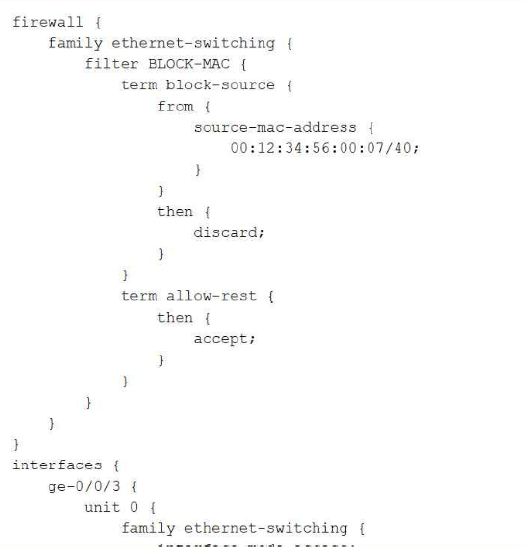
You need to apply a Layer 2 firewall filter on a Juniper Networks EX Series Switch to block traffic from the source MAC address 00:12:34:56:00:07 entering the switch on ge-0/0/3. After committing the configuration, traffic from the MAC address still passes through.
Referring to the exhibit, which statement is correct in this scenario?
The intent of this filter is to match and discard traffic from one single, specific host MAC address, which requires the source-mac-address match condition to reference the complete, exact 48-bit address using an explicit /48 mask (or no mask at all, which Junos treats as an implicit full match) so that only that one precise address is matched. As configured, the term instead specifies a /40 mask on 00:12:34:56:00:07, meaning only the first 40 bits (the first five octets, 00:12:34:56:00) are actually significant to the match, while the sixth octet is effectively wildcarded across its full range; this produces an imprecise, overly broad match criterion rather than the single-host match the administrator intended, and is a common configuration mistake that undermines the predictability and correctness of MAC-based filtering. The lesson tested here is that source and destination MAC address match conditions in Junos firewall filters must be specified with the correct, deliberate, and explicit prefix length appropriate to the intended scope --- typically /48 for a single exact host --- rather than an arbitrary or miscalculated mask value. Firewall filters under family ethernet-switching are fully capable of matching on both source-mac-address and destination-mac-address, which rules out that option entirely. Layer 2 MAC-based filters function correctly on both access and trunk interface modes, so interface type is not a limiting factor here. There is no indication in the exhibit that the filter's application direction (input versus output) is reversed. Reference topics: Junos Enterprise Switching -- Layer 2 Security, MAC Address Match Conditions and Prefix Length Precision.
[Exhibit]
Click the Exhibit button.
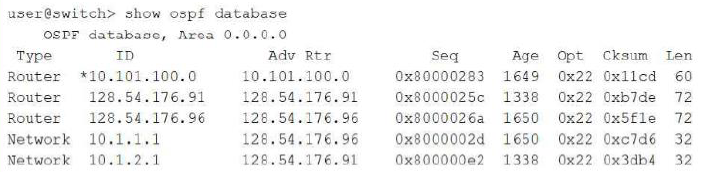
You run the show ospf database command and you see a Router LSA marked with an asterisk.
Referring to the exhibit, what is the significance of this result?
In the output of show ospf database, Junos marks every self-originated link-state advertisement with an asterisk immediately preceding the LSA's link-state ID. A self-originated LSA is one that was created and flooded by the router on which the command is being executed, as opposed to an LSA that was received from and originated by a neighboring router elsewhere in the area. In this exhibit, the asterisked Router LSA has an ID of 10.101.100.0 and an Advertising Router value of the same 10.101.100.0, confirming that this particular Router LSA describes the local device's own links, area membership, and interface costs, and that the local router itself flooded this LSA into the area's link-state database. This distinction matters operationally because when troubleshooting OSPF topology or SPF calculation issues, engineers frequently need to isolate their own router's advertised state from the states advertised by every other router in the area; the asterisk provides an immediate, unambiguous visual cue for that separation without needing to cross-reference the router's own ID separately. It has no relationship to designated router or backup designated router status --- DR/BDR roles are indicated elsewhere in interface-level output, not through the asterisk convention in the LSA database dump, and a router that is neither DR nor BDR still self-originates and flags its own Router LSA the same way. Reference topics: Junos Enterprise Routing -- OSPF, Interpreting the OSPF Link-State Database.
You need to block SSH (TCP port 22) traffic from the 192.168.10.0/24 network.
Which firewall filter term is correct in this scenario?
Correctly blocking SSH traffic originating from a specific network requires matching three precise conditions simultaneously in the from clause: the traffic's source-address must equal the 192.168.10.0/24 network, since the requirement is to block traffic coming from that network rather than traffic destined to it; the protocol must be explicitly set to tcp, since SSH operates exclusively over TCP; and the destination-port must be set to 22, because an inbound SSH connection request is always directed at the well-known SSH listening port 22 on the receiving side, regardless of which ephemeral source port the initiating client happens to use. The first option satisfies all three conditions correctly and pairs them with a discard action, cleanly dropping matching traffic. The second option incorrectly substitutes destination-address for source-address, which would match traffic heading toward that /24 rather than traffic originating from it, inverting the intended match direction. The third option incorrectly uses source-port 22 instead of destination-port 22; since the SSH client's source port is a randomly assigned ephemeral value rather than a fixed 22, this term would almost never match real SSH session-initiation traffic. The fourth option relies on a service ssh match condition, which is not valid syntax within the standard Junos firewall filter grammar for family inet; there is no such application-based keyword available at that hierarchy, making the term invalid regardless of the reject action chosen. Reference topics: Junos Enterprise Switching -- Firewall Filters, Matching on Address, Protocol, and Port Conditions.
- Select Question Types you want
- Set your Desired Pass Percentage
- Allocate Time (Hours : Minutes)
- Create Multiple Practice tests with Limited Questions
- Customer Support
Bao Li
11 days agoPatricia Baker
26 days ago