
 MENU
MENU
Exhibit
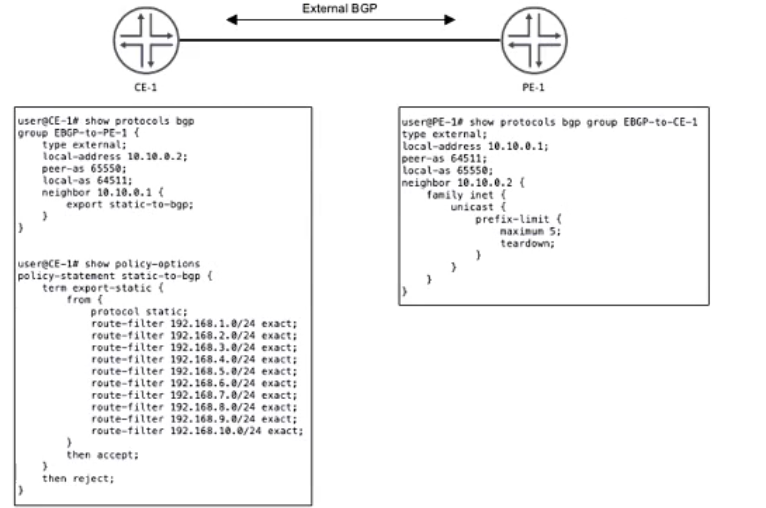
CE-1 must advertise ten subnets to PE-1 using BGP Once CE-1 starts advertising the subnets to PE-1, the BGP peering state changes to Active.
Referring to the CLI output shown in the exhibit, which statement is correct?
Analyzing the Exhibit and Understanding the Issue
The exhibit shows BGP configurations on CE-1 and PE-1, which are connected via EBGP.
CE-1 (Customer Edge)
Uses AS 64511 and establishes an EBGP session with PE-1 (AS 65550).
Configured to export 10 static routes (192.168.1.0/24 - 192.168.10.0/24) using the static-to-bgp policy.
PE-1 (Provider Edge)
Uses AS 65550 and is peering with CE-1 (AS 64511).
Configured with a prefix-limit of 5 on received routes from CE-1.
Teardown enabled, meaning if more than 5 prefixes are received, the BGP session is shut down.
Identifying the Problem
CE-1 is correctly configured with peer AS 65550, so Option B ('CE-1 is configured with an incorrect peer AS') is incorrect .
CE-1 is advertising exactly 10 static routes (as per policy).
PE-1 has a prefix-limit maximum 5 with teardown enabled.
This means that when CE-1 advertises more than 5 prefixes, PE-1 shuts down the BGP session.
BGP moves to the 'Active' state, indicating that the session has been disrupted and PE-1 is trying to re-establish the connection.
CE-1 is reachable since the session was initially established before the limit was exceeded, so Option D ('CE-1 is unreachable') is incorrect .
CE-1 is not advertising its entire routing table, only the static prefixes listed in the policy, so Option A ('CE-1 is advertising its entire routing table') is incorrect .
Correct Answer
C. The prefix limit has been reached on PE-1
Verification from Juniper Documentation
Juniper BGP Prefix Limit Documentation confirms that exceeding the prefix limit with teardown causes the BGP session to go into 'Active' state.
Juniper Troubleshooting Guide for BGP Peering Issues states that when a BGP session reaches the prefix limit and has teardown enabled, the session is terminated.
Currently there are no comments in this discussion, be the first to comment!