
 MENU
MENU
Exhibit
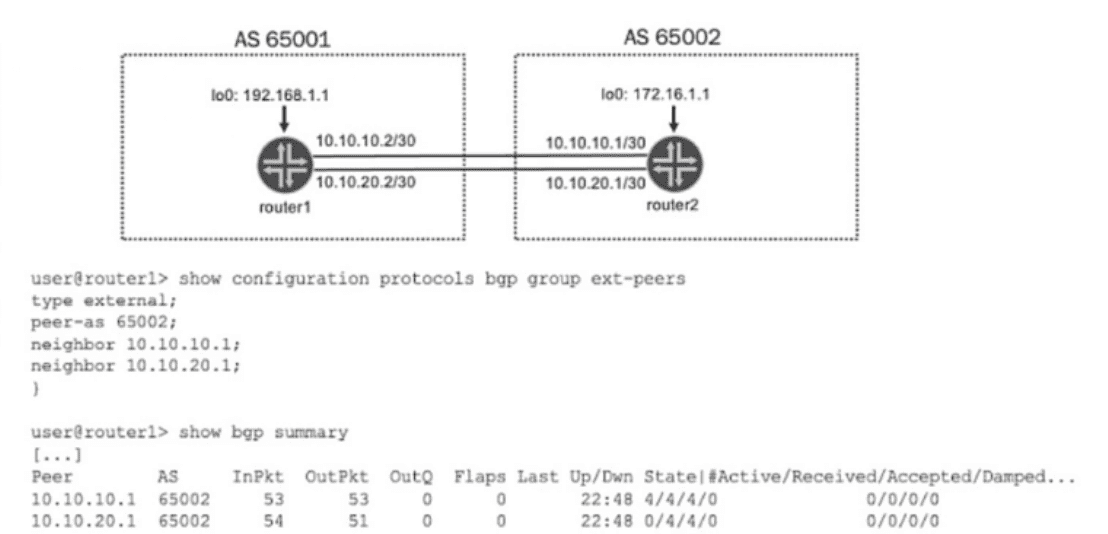
Referring to the exhibit, what will enable active routes from both peers?
The exhibit shows router1 (AS 65001) connected to router2 (AS 65002) via two parallel physical links. The show bgp summary output indicates that sessions are established with two neighbors: 10.10.10.1 and 10.10.20.1. Currently, for the second neighbor (10.10.20.1), there are 0 active routes despite having 4 accepted routes, which indicates that BGP has selected only one 'best path' via the first neighbor for forwarding.
BGP Best Path Selection: By default, BGP only selects a single best path for any given destination prefix and installs that one path into the forwarding table. In a topology with parallel links to the same AS, this leads to underutilization of available bandwidth.
Multipath Solution (Option B): To enable active routes from both peers and allow for load-balancing (ECMP) across both links, you must enable the multipath feature.
When the multipath statement is configured under the protocols bgp group ext-peers hierarchy, it tells Junos OS to install multiple equal-cost BGP paths into the routing table and subsequent forwarding table.
Since both neighbors belong to the same peer group (ext-peers) and the same AS (65002), configuring multipath at the group level will apply to both sessions, allowing paths from both neighbors to be marked as 'active'.
Incorrect Options:
Option A: 172.16.1.1 is the loopback address of router2. The exhibit shows peering is currently done using physical interface addresses (10.10.10.1 and 10.10.20.1), so this address is irrelevant to the current active sessions.
Option C: Configuring the neighbor address alone without the multipath parameter will not change the best-path selection behavior.
Option D: 10.10.20.2 is the local interface IP of router1, not the neighbor's IP. BGP multipath must be configured to point to remote peer paths.
Configuration Example for Junos OS 24.4: To implement this, apply the following command: set protocols bgp group ext-peers multipath