
Free Preparation Discussions
 MENU
MENU
Huawei H12-891_V1.0 Exam Questions
- Huawei Certified ICT Expert HCIE Certifications
- Huawei HCIE Datacom Certifications
- Topic 1: Advanced Routing and Switching Technology: This topic covers various advanced aspects of routing and switching technology, including Advanced IGP Features, Advanced BGP Features, Network Security Technologies, and MPLS LDP Fundamentals and Configuration.
- Topic 2: Campus Network Planning and Deployment: This topic encompasses the essentials of planning and deploying campus networks, which include Enterprise Network Introduction, Enterprise Campus Network Overview, VXLAN and Campus Network Virtualization.
- Topic 3: WAN Interconnection Planning and Deployment: It involves the strategies and technologies for WAN interconnection planning and deployment. The topic also focuses on WAN Interconnection Solution and Technologies Overview.
- Topic 4: Bear WAN Planning and Deployment: This topic focuses on the planning and deployment of bearer WANs, including Enterprise Bearer WAN Solution, Enterprise Bearer WAN Architecture and Key Technologies.
- Topic 5: Network Automation: The topic delves into the automation of networks, including Network Automation Overview, SSH Fundamentals and Practice, NETCONF YANG Fundamentals and Practice, Telemetry Fundamentals and Practice, and OPS Fundamentals and Practice.
Free Huawei H12-891_V1.0 Exam Actual Questions
Note: Premium Questions for H12-891_V1.0 were last updated On Sep. 07, 2026 (see below)
In 6PE networking, the shared explicit null label function can be enabled on routers to reduce the number of required MPLS labels. With this function, a router assigns a label with the value (enter only digits) to all 6PE routes.
0In 6PE (IPv6 over MPLS for Provider Edge), the shared explicit null label value is 0. When this function is enabled, the PE router assigns label 0 (IPv4 Explicit Null) to all IPv6 routes, reducing the label space consumption. This is known as label 0 reuse for IPv6 forwarding over MPLS.Exact Extract - HCIE-Datacom IPv6/MPLS Integration Section:''To optimize label usage in 6PE deployments, shared explicit null label (label 0) can be assigned to all 6PE routes.''
Huawei HCIE-Datacom Guide -- IPv6 over MPLS (6PE and 6VPE)
Huawei Training Manual -- MPLS IPv6 Label Assignment
What can be determined from the following figure?
Total Number of Routes: 2
*>i Network : 3002::3
NextHop : 3000:FDEA::3
MED : 0
Path/Orgn : i
*>i Network : 3002::4
NextHop : 3000:FDEA::3
MED : 0
PrefixLen : 128
LocPrf : 100
PrefVal : 0
Path/Orgn : 65001 i
The command output shows:
*>i before both networks, which means these routes are the preferred routes (*) and are learned via internal BGP (i).
Two networks are listed: 3002::3 and 3002::4, which means R1 does have these two routes in its BGP IPv6 routing table.
For 3002::4, the path origin shows 65001 i, which means this route originated from AS 65001 and was learned through IBGP.
The AS Path attribute is only shown for 3002::4, but both routes are clearly present.
Therefore, the correct conclusion is:
In DU label advertisement mode, if the liberal label retention mode is used, the device reserves labels received from all the LDP peers regardless of whether the LDP peer is the optimal next hop for reaching the destination network.
In MPLS LDP (Label Distribution Protocol), label retention modes control how labels are stored in the Label Forwarding Information Base (LFIB).
DU Label Advertisement Mode (Downstream Unsolicited):
Labels are advertised to all LDP peers without a request.
The receiving router decides which label to use for forwarding.
Liberal vs. Conservative Label Retention:
Liberal Label Retention Mode (Correct Answer)
All received labels from all LDP peers are stored.
Even if a peer is not the optimal next hop, its label is retained.
Allows faster convergence during failures.
Conservative Label Retention Mode
Only the label from the best next-hop peer is stored.
Reduces memory usage but can slow down convergence in case of failure.
Reference from Huawei HCIE-Datacom Documentation:
Huawei MPLS LDP Configuration Guide -- Liberal vs. Conservative Label Retention
HCIE-Datacom Training Material -- Label Advertisement in MPLS Networks
Exhibit:
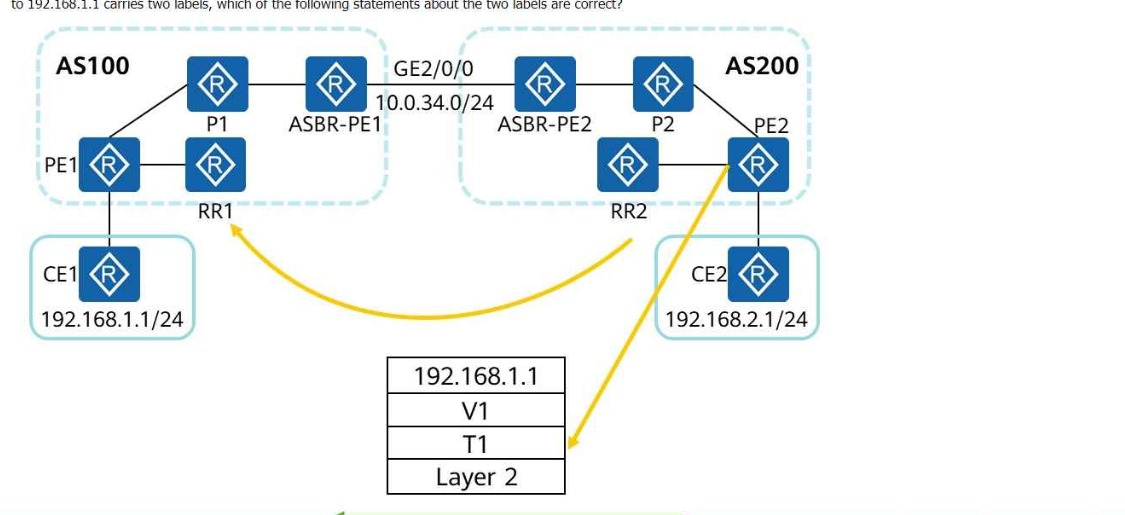
The following figure shows the inter-AS MPLS VPN Option C (solution 2). RRs are deployed, and no traffic passes through the RRs during forwarding. If a data packet sent from PE2 to 192.168.1.1 carries two labels, which of the following statements about the two labels are correct?
Understanding Inter-AS MPLS VPN Option C (Solution 2)
In MPLS L3VPN Inter-AS Option C, the Route Reflectors (RRs) are used for VPN route distribution but do not participate in data forwarding. The traffic forwarding path is based on MPLS labels assigned at different routers.
Each data packet carries two MPLS labels:
Transport Label (T1) -- Used for forwarding within the backbone.
VPN Label (V1) -- Used for VPN route identification.
Breaking Down the Labels:
VPN Label (V1) -- Allocated by PE1 (Answer: C )
V1 (Inner Label) is the VPN label assigned by the egress PE router (PE1).
This label ensures that when the packet reaches PE1, it knows how to forward the traffic to CE1 (192.168.1.1).
Transport Label (T1) -- Allocated by P2 (Answer: B )
T1 (Outer Label) is the transport label assigned by P2 to forward the packet across the AS core.
This label ensures the packet reaches the next-hop router (ASBR-PE1 in AS100).
Why Are the Other Options Incorrect?
A. 'T1 is allocated by RR2' (Incorrect)
RR2 is used only for route reflection; it does not participate in label allocation or forwarding.
D. 'V1 is allocated by P2' (Incorrect)
P2 is an intermediate router and does not allocate VPN labels.
VPN labels are always assigned by the egress PE router (PE1 in AS100).
Reference: Huawei HCIE Datacom -- MPLS L3VPN Inter-AS Option C
OSPF is deployed on a campus network to implement network interconnection. The LSDB of R2 is shown in the figure.
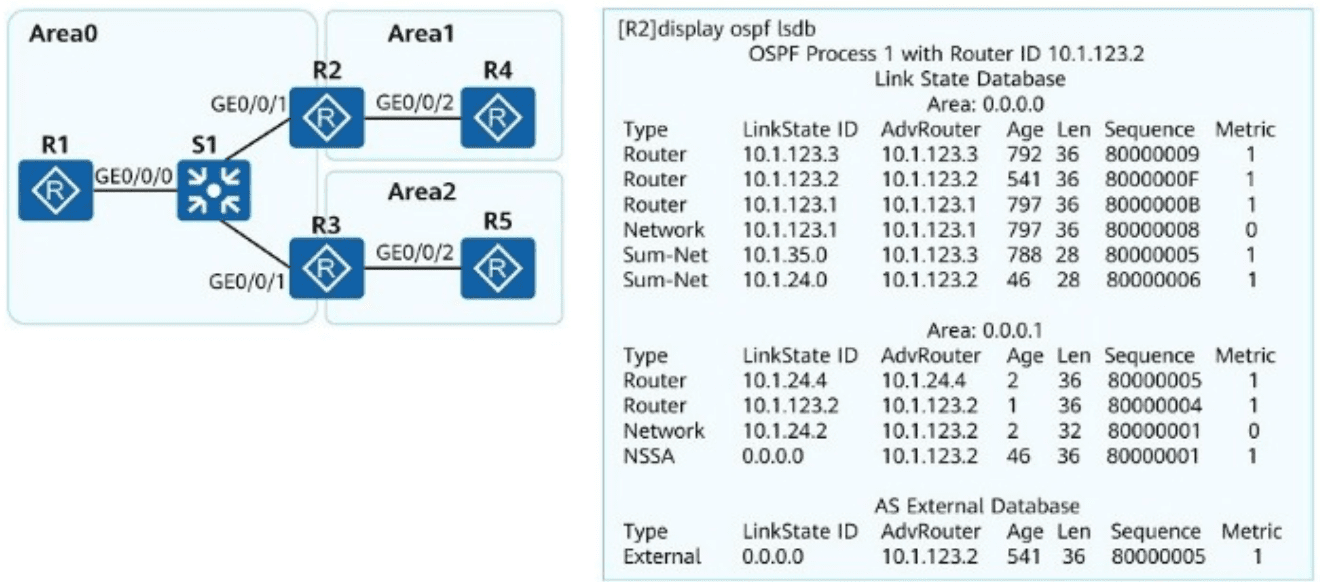
What can be determined from the LSDB?
To analyze this question, let's break down the key concepts and the given LSDB (Link State Database) information from the figure:
Understanding the LSDB Output:
The output shows the OSPF LSDB on R2 with Router ID 10.1.123.2.
Area 0.0.0.0 (Area 0) is displayed along with several Link State Advertisements (LSAs) including Router LSAs, Network LSAs, and Summary LSAs.
Area 0.0.0.1 (Area 1) also displays Router LSAs and a Type 7 LSA (NSSA LSA) with Link-State ID 0.0.0.0.
An External LSA (Type 5) with Link-State ID 0.0.0.0 and AdvRouter 10.1.123.2 is also present.
Analysis of Each Option:
Option A: Area 1 is an NSSA.
Correct.
The presence of a Type 7 LSA (NSSA LSA) in the database indicates that Area 1 is configured as an NSSA (Not-So-Stubby Area).
NSSA allows the injection of Type 7 LSAs for external routes while blocking Type 5 LSAs from entering the area.
Option B: R2 translates Type 7 default route into Type 5 default route.
Correct.
In an NSSA, if an ABR (like R2) has the NSSA ASBR capability, it will convert Type 7 LSAs to Type 5 LSAs before injecting them into the backbone area (Area 0).
In the LSDB, we see both a Type 7 LSA (NSSA) and a corresponding Type 5 External LSA, confirming that R2 performs this translation.
Option C: R2 advertises the default route in the OSPF process.
Incorrect.
There is no indication that R2 itself is originating the default route.
The Type 7 LSA in Area 1 and the Type 5 LSA in Area 0 only indicate translation from another source, not R2 advertising it directly.
Option D: Area 1 does not have Type 3 LSAs. The possible cause is that R2 filters Type 3 LSAs in the outbound direction of Area 1.
Incorrect.
In an NSSA area, Type 3 LSAs (Inter-Area Prefix LSAs) are typically not generated for external routes.
The absence of Type 3 LSAs in Area 1 is due to the nature of NSSA itself rather than any filtering configured on R2.
Huawei HCIE-Datacom V1.0 Training Materials
Huawei Official Documentation: OSPF Configuration Guide
Huawei OSPFv3 Configuration Guide
RFC 3101 - The OSPF Not-So-Stubby Area (NSSA) Option
HCIE-Datacom Knowledge Base: OSPF Advanced Concepts
===========
- Select Question Types you want
- Set your Desired Pass Percentage
- Allocate Time (Hours : Minutes)
- Create Multiple Practice tests with Limited Questions
- Customer Support
Anthony Clark
15 days agoAdam Morris
25 days agoKaren Robinson
2 months agoWilliam Sanchez
2 months agoDonald Hall
3 months agoKaren Reed
3 months agoBrenda Campbell
4 months agoMatthew Harris
4 months agoPatricia Rivera
4 months agoAmy Roberts
5 months agoAshley White
5 months agoBrenda Flores
5 months agoStephen Torres
4 months agoBrenda Garcia
5 months agoElizabeth Cooper
4 months agoSol
5 months agoJanet
6 months agoNobuko
6 months agoVirgina
6 months agoLorean
6 months agoJolene
7 months agoJavier
7 months agoArmando
7 months agoLashanda
7 months agoCyril
8 months agoJoaquin
8 months agoLenna
8 months agoAnnett
8 months agoJulio
9 months agoBok
9 months agoSkye
9 months agoNohemi
9 months agoLeatha
10 months agoNorah
10 months agoParis
10 months agoMelodie
10 months agoSue
11 months agoTheodora
11 months agoAmie
11 months agoMitsue
11 months agoBrigette
12 months agoWei
12 months agoMollie
12 months agoNelida
12 months agoKeva
1 year agoLaurel
1 year agoSalome
1 year agoIra
1 year agoLinwood
1 year agoHenriette
1 year agoRosalyn
1 year agoNoe
1 year agoGail
1 year agoCaprice
1 year agoMerilyn
1 year agoMaira
2 years agoStephanie
2 years agoLeontine
2 years agoLeonora
2 years agoBong
2 years agoLavina
2 years agoKeva
2 years agoPrecious
2 years agoPortia
2 years agoJoesph
2 years agoDaniel
2 years agoLeigha
2 years agoEvangelina
2 years agoMargery
2 years agoAgustin
2 years agoHerminia
2 years agoHaydee
2 years agoGabriele
2 years agoNell
2 years agoRodney
2 years agoStevie
2 years agoMarilynn
2 years agoNoemi
2 years agoJules
2 years agoLisha
2 years agoRaylene
2 years agoEvangelina
2 years agoTammara
2 years agoViva
2 years agoShawnna
2 years agoCordell
2 years agoLezlie
2 years agoLenna
2 years agoEva
2 years ago