
Free Preparation Discussions
 MENU

HPE7-A08 Exam Questions
- Topic 1: Create the Implementation Plan for the Wired Network Solution: This section measures the skills of Network Designers who focus on understanding the HPE switching portfolio and selecting the right products to match various customer requirements. Candidates must also demonstrate the ability to create detailed and effective implementation plans based on given designs or customer scenarios to ensure successful wired network deployments.
- Topic 2: Install and Configure the Wired Network Solution: This domain evaluates the abilities of Network Engineers to provision and configure HPE Aruba Networking switches both via Aruba Networking Central and command-line interface. It covers physical switch setup, Layer 2 and Layer 3 configuration and validation, multicast features, security implementations, quality of service (QoS) settings, and integration of Aruba Networking solutions into existing environments.
- Topic 3: Troubleshoot the Wired Network Solution: Candidates in this section, typically Network Support Specialists, are tested on identifying common wired network failures such as IP or VLAN mismatches, hardware issues, or port misconfigurations. It also involves analyzing performance problems caused by QoS or configuration errors and formulating effective remediation plans to restore correct network operations.
- Topic 4: Manage, Maintain, Optimize, and Monitor the Wired Network Solution: This part measures the skills of Network Operations Engineers in managing and maintaining wired network infrastructures. It includes developing configuration management strategies, interpreting network operational data to make informed decisions, and programmatically auditing or configuring Aruba Networking switches to optimize performance and reliability.
Free HP HPE7-A08 Exam Actual Questions
Note: Premium Questions for HPE7-A08 were last updated On Oct. 24, 2026 (see below)
You have added a switch with existing configuration to an existing group in HPE Aruba Networking Central but the configuration is not synchronizing. What could cause this?
This scenario highlights the 'Source of Truth' logic within Aruba Central UI Groups.
UI Group Constraints: When a group is managed via the UI (User Interface) mode, Central acts as the absolute master of the configuration. If you add a switch that already has a local configuration (non-factory default) into a group that already has an established configuration, Central perceives a Configuration Conflict.
The Safety Mechanism: To prevent Central from accidentally wiping out a production switch's settings the moment it connects, Central will not automatically synchronize (push) the group configuration to a device that is not in a Factory Default state.
The Resolution: For the switch to synchronize with an existing UI group, you must either:
Erase the startup-configuration on the switch and reboot it (Factory Default), allowing it to 'pull' the group config cleanly.
Manually resolve the conflict by moving the device into the group and then selecting the option to overwrite the local configuration with the group configuration.
Evaluating Other Options:
Option A: This is false. Central fully supports VSX monitoring and configuration (specifically via Template groups or the VSX orchestration UI).
Option B: If the switch is 'added to a group,' it has already passed the initial onboarding/authorization phase.
Option C: If it 'cannot establish a connection,' the switch would show as Offline, not as a synchronization failure within a group.
Which statement is valid when enabling ARP protection features on HPE Aruba Networking CX switches?
When enabling ARP protection, it is best practice to wait at least a week after enabling DHCP snooping before enabling ARP protection in a live network. This allows the DHCP snooping binding table to stabilize, ensuring ARP protection has accurate IP-MAC bindings, reducing false positives.
Immediate ARP protection may cause legitimate traffic to be dropped.
Lease times and DHCP server utilization are less critical.
This staged approach minimizes disruption.
ArubaOS-CX Security Features Best Practices
HPE Aruba ARP Protection Configuration Guide
Aruba Network Security Deployment Guidelines
You are testing the use of the automated port-access role configuration process using RadSec authentication over VXLAN. During your testing, you observed that the RadSec connection will fail during the digital certificate exchange.
What would be the cause of this issue?
You are deploying a new AOS-10 mobility gateway cluster. Due to customer requirements, the gateways must be configured with static IP addresses and are restricted from communicating using port 443 to any URLs except for *. central.arubanetworks.com.
How would you onboard these gateways successfully into HPE Aruba Networking Central?


You have attempted to configure DHCP snooping, but it is not working as expected. Based on the output below, what do you need to configure?
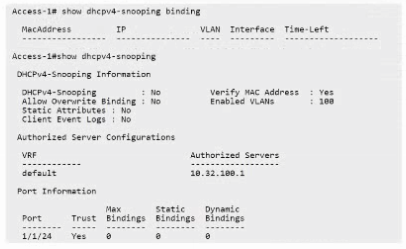
DHCP snooping requires to be enabled globally before it will function correctly. If it is not enabled globally, even if enabled on VLAN interfaces, DHCP snooping will not work.
Enabling authorized DHCP servers (A) or trusted interfaces (B) is necessary but only after global enabling.
Enabling DHCP snooping on VLAN (C) is not sufficient without global enablement.
Therefore, enabling DHCP snooping globally is the first step to activate the feature.
ArubaOS-CX DHCP Snooping Configuration Guide
HPE Aruba Networking Security Best Practices
Aruba DHCP Snooping Troubleshooting Documentation
- Select Question Types you want
- Set your Desired Pass Percentage
- Allocate Time (Hours : Minutes)
- Create Multiple Practice tests with Limited Questions
- Customer Support
Patricia Scott
1 month agoSteven Hill
2 months agoNathan Morgan
2 months agoCarol Robinson
3 months agoRichard Robinson
3 months agoPaul Anderson
4 months agoKaren Moore
4 months agoJennifer Clark
5 months agoKevin Williams
5 months agoMargaret Hernandez
6 months agoDonna Lewis
6 months agoDavid Peterson
6 months agoDorothy Green
6 months agoRachel Parker
5 months agoEmily Sanchez
6 months agoChristopher Bell
6 months agoLisandra
7 months agoErick
7 months agoLoreta
7 months agoGail
8 months agoYvette
8 months agoBrendan
8 months agoErnest
8 months agoZena
9 months agoGladis
9 months agoVeta
9 months agoQuentin
9 months agoErick
10 months agoHolley
10 months agoReita
10 months agoAndree
10 months agoTiera
11 months agoTresa
11 months agoMelvin
11 months agoOren
11 months agoGeorgeanna
12 months agoFrank
12 months agoGlory
1 year agoJennifer
1 year agoDiego
1 year agoJoseph
1 year agoStanford
1 year agoKris
1 year agoRaymon
1 year agoDelisa
1 year agoVesta
1 year agoMarsha
1 year agoJesus
1 year ago