
New Year Sale 2026! Hurry Up, Grab the Special Discount - Save 25% - Ends In 00:00:00 Coupon code: SAVE25
Welcome to Pass4Success

- Free Preparation Discussions

Google Professional Security Operations Engineer Exam Questions

Exam Name: Professional Security Operations Engineer
Exam Code: Professional Security Operations Engineer
Related Certification(s): Google Cloud Certified Certification
Certification Provider: Google
Actual Exam Duration: 120 Minutes
Number of Professional Security Operations Engineer practice questions in our database: 60 (updated: Feb. 19, 2026)
Expected Professional Security Operations Engineer Exam Topics, as suggested by Google :
  • Topic 1: Platform Operations: This section of the exam measures the skills of Cloud Security Engineers and covers the configuration and management of security platforms in enterprise environments. It focuses on integrating and optimizing tools such as Security Command Center (SCC), Google SecOps, GTI, and Cloud IDS to improve detection and response capabilities. Candidates are assessed on their ability to configure authentication, authorization, and API access, manage audit logs, and provision identities using Workforce Identity Federation to enhance access control and visibility across cloud systems.
  • Topic 2: Data Management: This section of the exam measures the skills of Security Analysts and focuses on effective data ingestion, log management, and context enrichment for threat detection and response. It evaluates candidates on setting up ingestion pipelines, configuring parsers, managing data normalization, and handling costs associated with large-scale logging. Additionally, candidates demonstrate their ability to establish baselines for user, asset, and entity behavior by correlating event data and integrating relevant threat intelligence for more accurate monitoring.
  • Topic 3: Threat Hunting: This section of the exam measures the skills of Cyber Threat Hunters and emphasizes proactive identification of threats across cloud and hybrid environments. It tests the ability to create and execute advanced queries, analyze user and network behaviors, and develop hypotheses based on incident data and threat intelligence. Candidates are expected to leverage Google Cloud tools like BigQuery, Logs Explorer, and Google SecOps to discover indicators of compromise (IOCs) and collaborate with incident response teams to uncover hidden or ongoing attacks.
  • Topic 4: Detection Engineering: This section of the exam measures the skills of Detection Engineers and focuses on developing and fine-tuning detection mechanisms for risk identification. It involves designing and implementing detection rules, assigning risk values, and leveraging tools like Google SecOps Risk Analytics and SCC for posture management. Candidates learn to utilize threat intelligence for alert scoring, reduce false positives, and improve rule accuracy by integrating contextual and entity-based data, ensuring strong coverage against potential threats. Incident Response: This section of the exam measures the skills of Incident Response Managers and assesses expertise in containing, investigating, and resolving security incidents. It includes evidence collection, forensic analysis, collaboration across engineering teams, and isolation of affected systems. Candidates are evaluated on their ability to design and execute automated playbooks, prioritize response steps, integrate orchestration tools, and manage case lifecycles efficiently to streamline escalation and resolution processes.
  • Topic 5: Monitoring and Reporting: This section of the exam measures the skills of Security Operations Center (SOC) Analysts and covers building dashboards, generating reports, and maintaining health monitoring systems. It focuses on identifying key performance indicators (KPIs), visualizing telemetry data, and configuring alerts using tools like Google SecOps, Cloud Monitoring, and Looker Studio. Candidates are assessed on their ability to centralize metrics, detect anomalies, and maintain continuous visibility of system health and operational performance.
Disscuss Google Professional Security Operations Engineer Topics, Questions or Ask Anything Related
0/2000 characters

Kirk

6 days ago
Pass4Success helped me conquer the Google Security Operations Engineer exam. Grateful for their excellent study resources.
upvoted 0 times
...

Maybelle

13 days ago
The most challenging section was the Cloud Security posture and identity access management questions. The practice exams drilled me on policy impacts and how changes cascade—PASS4SUCCESS prepped me to spot traps.
upvoted 0 times
...

Helaine

20 days ago
I felt the butterflies during prep and feared failing under time constraints. PASS4SUCCESS’s targeted drills and exam simulations sharpened my timing and decision-making. Trust the process and keep grinding—great outcomes are within reach.
upvoted 0 times
...

Stacey

28 days ago
Exam covers security incident response and forensics. Understand how to investigate and respond to security incidents.
upvoted 0 times
...

Mitsue

1 month ago
Aced the Google Security Operations Engineer certification with the help of Pass4Success. Highly recommended!
upvoted 0 times
...

Raymon

1 month ago
Aced the Google Security Ops exam! Tip: use PASS4SUCCESS practice tests to identify your weak areas and create a targeted study plan. Saved me so much time.
upvoted 0 times
...

Rene

2 months ago
Expect questions on vulnerability management. Know how to identify, assess, and mitigate vulnerabilities in your infrastructure.
upvoted 0 times
...

Tyisha

2 months ago
I passed the exam recently with the aid of Pass4Success practice questions, which drilled in the fundamentals of threat modeling and risk assessment. One memorable exam item involved threat hunting and data enrichment, where the question described a suspicious beacon from an endpoint and asked which additional telemetry would most quickly validate a compromise; I hesitated because it hinged on understanding MITRE ATT&CK tactics, but I chose a reasonable enrichment path and moved on. The topic I’m referencing here is endpoint security telemetry and enrichment.
upvoted 0 times
...

Sage

2 months ago
I struggled with threat hunting analytics and log correlation. The tricky questions on MITRE mapping were tough, but PASS4SUCCESS drills exposed common pitfalls and gave me templates to follow.
upvoted 0 times
...

Audrie

2 months ago
The initial nerves hit hard, doubting if I’d remember the details under pressure. PASS4SUCCESS gave me structured study paths and realistic practice labs, making the material feel manageable. Believe in your preparation and keep pushing forward—you’re closer than you think.
upvoted 0 times
...

Vincenza

3 months ago
Passed the Google Professional Security Operations Engineer exam! PASS4SUCCESS practice exams were a game-changer - they really helped me understand the exam format and focus my studies.
upvoted 0 times
...

Krystina

3 months ago
The hardest part for me was the incident response workflows—figuring out the right sequence under pressure, and the practice exams clarified the steps I should take and how to document them quickly. PASS4SUCCESS practice helped me internalize the runbooks.
upvoted 0 times
...

Kristel

3 months ago
Passing the Google Security Operations Engineer exam was a breeze thanks to Pass4Success's comprehensive practice questions.
upvoted 0 times
...

Gussie

3 months ago
I was nervous before the exam, unsure if I could handle the real-world scenarios. PASS4SUCCESS broke down complex topics into clear, actionable steps and boosted my confidence with practical practice. Stay curious, stay persistent—you’ve got this and you’ll emerge stronger from every challenge.
upvoted 0 times
...

Juliann

4 months ago
Exam covers cloud security best practices. Understand how to configure and manage security controls in Google Cloud Platform.
upvoted 0 times
...

Casey

4 months ago
I'm thrilled to have passed the Google Certified: Professional Security Operations Engineer exam! Thanks, Pass4Success, for the great prep materials.
upvoted 0 times
...

Jean

4 months ago
I just cleared the Google Professional Security Operations Engineer exam, and I must say the real edge came from practicing with Pass4Success practice questions; they helped me stay calm on exam day and verify tricky concepts, especially around incident response planning and escalation procedures. A question I found tough asked about correlating detections from a SIEM to a formal incident response playbook, specifically how to categorize a suspected ransomware activity based on sequence and TTPs, which I wasn’t completely sure about at first, but I reasoned through the playbook steps and still managed to pass. The prompt required mapping containment options to asset criticality and available playbooks, which was challenging in real-time.
upvoted 0 times
...

Melita

4 months ago
Passed the Google Certified: Professional Security Operations Engineer exam with the help of Pass4Success practice questions. Be prepared to analyze security incidents and respond effectively.
upvoted 0 times
...

Free Google Professional Security Operations Engineer Exam Actual Questions

Note: Premium Questions for Professional Security Operations Engineer were last updated On Feb. 19, 2026 (see below)

Question #1

Your company is adopting a multi-cloud environment. You need to configure comprehensive monitoring of threats using Google Security Operations (SecOps). You want to start identifying threats as soon as possible. What should you do?

Reveal Solution Hide Solution
Correct Answer: B

Comprehensive and Detailed Explanation

The correct solution is Option B. The key requirements are 'comprehensive monitoring' and 'as soon as possible' in a 'multi-cloud environment.'

Google Security Operations provides Curated Detections, which are out-of-the-box, fully managed rule sets maintained by the Google Cloud Threat Intelligence (GCTI) team. These rules are designed to provide immediate value and broad threat coverage without requiring manual rule writing, tuning, or maintenance.

Within the curated detection library, the Cloud Threats category is the specific rule set designed to detect threats against cloud infrastructure. This category is not limited to Google Cloud; it explicitly includes detections for anomalous behaviors, misconfigurations, and known attack patterns across multi-cloud environments, including AWS and Azure.

Enabling this category is the fastest and most effective way to meet the requirement. Option A (using Gemini) requires manual effort to generate, validate, and test rules. Option C (Applied Threat Intelligence) is a different category that focuses primarily on matching known, high-impact Indicators of Compromise (IOCs) from GCTI, which is less comprehensive than the behavior-based rules in the 'Cloud Threats' category. Option D is procedurally incorrect; Customer Care provides support, but detection content is delivered directly within the SecOps platform.

Exact Extract from Google Security Operations Documents:

Google SecOps Curated Detections: Google Security Operations provides access to a library of curated detections that are created and managed by Google Cloud Threat Intelligence (GCTI). These rule sets provide a baseline of threat detection capabilities and are updated continuously.

Curated Detection Categories: Detections are grouped into categories that you can enable based on your organization's needs and data sources. The 'Cloud Threats' category provides broad coverage for threats targeting cloud environments. This rule set includes detections for anomalous activity and common attack techniques across GCP, AWS, and Azure, making it the ideal choice for securing a multi-cloud deployment. Enabling this category allows organizations to start identifying threats immediately.


Google Cloud Documentation: Google Security Operations > Documentation > Detections > Curated detections > Curated detection rule sets

Google Cloud Documentation: Google Security Operations > Documentation > Detections > Curated detections > Cloud Threats rule set

Question #2

You are responsible for identifying suspicious activity and security events in your organization's environment. You discover that some detection rules are generating false positives when the principal.ip field contains one or more IP addresses in the 192.168.2.0/24 subnet. You want to improve these detection rules using the principal.ip repeated field. What should you add to the YARA-L detection rules?

Reveal Solution Hide Solution
Correct Answer: D

Comprehensive and Detailed Explanation

The correct solution is Option D. The goal is to exclude events (i.e., stop false positives) when the principal.ip field contains any IP from the trusted 192.168.2.0/24 subnet.

The principal.ip field in UDM is a repeated field, meaning it can hold an array of values (e.g., ['1.2.3.4', '192.168.2.5']). YARA-L provides the any and all quantifiers to handle repeated fields.9

any $e.principal.ip: This checks if at least one IP in the array meets the condition.

all $e.principal.ip: This checks if every IP in the array meets the condition.

The function net.ip_in_range_cidr(...) returns true if an IP is in the specified range.

Therefore, the logic we need is: 'do not trigger this rule if any of the IPs in the principal.ip field are in the 192.168.2.0/24 range.'

This translates directly to the YARA-L syntax: not net.ip_in_range_cidr(any $e.principal.ip, '192.168.2.0/24')

Option B would only find events from that subnet.

Option A would only find events where all associated IPs are in that subnet.

Option C is the logical inverse of A and would incorrectly filter out events that might be malicious (e.g., ['1.2.3.4', '192.168.2.5'] would not be excluded because all IPs are not in the range).

Exact Extract from Google Security Operations Documents:

YARA-L 2.0 language syntax > Repeated fields and boolean expressions: When a boolean expression, such as a function call, is applied to a repeated field, you can use the any or all keywords to specify how the expression should be evaluated.10

any <repeated_field>: The expression evaluates to true if it is true for at least one of the values in the repeated field.

all <repeated_field>: The expression evaluates to true only if it is true for all of the values in the repeated field.

Functions > net.ip_in_range_cidr: The net.ip_in_range_cidr function is useful to bind rules to specific parts of the network.11 To exclude all private netblocks as defined in RFC1918, you can add a not to the start of the criteria:

and not (net.ip_in_range_cidr(any $e.principal.ip, '10.0.0.0/8') or net.ip_in_range_cidr(any $e.principal.ip, '172.16.0.0/12') or net.ip_in_range_cidr(any $e.principal.ip, '192.168.0.0/16'))


Google Cloud Documentation: Google Security Operations > Documentation > Detections > YARA-L 2.0 language syntax

Google Cloud Documentation: Google Security Operations > Documentation > Detections > YARA-L 2.0 functions > net.ip_in_range_cidr

Question #3

You are conducting proactive threat hunting in your company's Google Cloud environment. You suspect that an attacker compromised a developer's credentials and is attempting to move laterally from a development Google Kubernetes Engine (GKE) cluster to critical production systems. You need to identify IoCs and prioritize investigative actions by using Google Cloud's security tools before analyzing raw logs in detail. What should you do next?

Reveal Solution Hide Solution
Correct Answer: A

Comprehensive and Detailed 150 to 250 words of Explanation From Exact Extract Google Security Operations Engineer documents:

The key requirements are to 'proactively hunt,' 'prioritize investigative actions,' and identify 'lateral movement' paths before deep log analysis. This is the primary use case for Security Command Center (SCC) Enterprise. SCC aggregates all findings from Google Cloud services and correlates them with assets. By filtering on the GKE cluster, the analyst can see all associated findings (e.g., from Event Threat Detection) which may contain initial IoCs.

More importantly, SCC's attack path simulation feature is specifically designed to 'prioritize investigative actions' by modeling how an attacker could move laterally. It visualizes the chain of exploits---such as a misconfigured GKE service account with excessive permissions, combined with a public-facing service---that an attacker could use to pivot from the development cluster to high-value production systems. Each path is given an attack exposure score, allowing the hunter to immediately focus on the most critical risks.

Option C is too narrow, as it only checks for malware on nodes, not the lateral movement path. Option B is a later step used to enrich IoCs after they are found. Option D is an automated response (SOAR), not a proactive hunting and prioritization step.

(Reference: Google Cloud documentation, 'Security Command Center overview'; 'Attack path simulation and attack exposure scores')


Question #4

You are responsible for identifying suspicious activity and security events in your organization's environment. You discover that some detection rules are generating false positives when the principal.ip field contains one or more IP addresses in the 192.168.2.0/24 subnet. You want to improve these detection rules using the principal.ip repeated field. What should you add to the YARA-L detection rules?

Reveal Solution Hide Solution
Correct Answer: D

Comprehensive and Detailed Explanation

The correct solution is Option D. The goal is to exclude events (i.e., stop false positives) when the principal.ip field contains any IP from the trusted 192.168.2.0/24 subnet.

The principal.ip field in UDM is a repeated field, meaning it can hold an array of values (e.g., ['1.2.3.4', '192.168.2.5']). YARA-L provides the any and all quantifiers to handle repeated fields.9

any $e.principal.ip: This checks if at least one IP in the array meets the condition.

all $e.principal.ip: This checks if every IP in the array meets the condition.

The function net.ip_in_range_cidr(...) returns true if an IP is in the specified range.

Therefore, the logic we need is: 'do not trigger this rule if any of the IPs in the principal.ip field are in the 192.168.2.0/24 range.'

This translates directly to the YARA-L syntax: not net.ip_in_range_cidr(any $e.principal.ip, '192.168.2.0/24')

Option B would only find events from that subnet.

Option A would only find events where all associated IPs are in that subnet.

Option C is the logical inverse of A and would incorrectly filter out events that might be malicious (e.g., ['1.2.3.4', '192.168.2.5'] would not be excluded because all IPs are not in the range).

Exact Extract from Google Security Operations Documents:

YARA-L 2.0 language syntax > Repeated fields and boolean expressions: When a boolean expression, such as a function call, is applied to a repeated field, you can use the any or all keywords to specify how the expression should be evaluated.10

any <repeated_field>: The expression evaluates to true if it is true for at least one of the values in the repeated field.

all <repeated_field>: The expression evaluates to true only if it is true for all of the values in the repeated field.

Functions > net.ip_in_range_cidr: The net.ip_in_range_cidr function is useful to bind rules to specific parts of the network.11 To exclude all private netblocks as defined in RFC1918, you can add a not to the start of the criteria:

and not (net.ip_in_range_cidr(any $e.principal.ip, '10.0.0.0/8') or net.ip_in_range_cidr(any $e.principal.ip, '172.16.0.0/12') or net.ip_in_range_cidr(any $e.principal.ip, '192.168.0.0/16'))


Google Cloud Documentation: Google Security Operations > Documentation > Detections > YARA-L 2.0 language syntax

Google Cloud Documentation: Google Security Operations > Documentation > Detections > YARA-L 2.0 functions > net.ip_in_range_cidr

Question #5

You are implementing Google Security Operations (SecOps) for your organization. Your organization has their own threat intelligence feed that has been ingested to Google SecOps by using a native integration with a Malware Information Sharing Platform (MISP). You are working on the following detection rule to leverage the command and control (C2) indicators that were ingested into the entity graph.
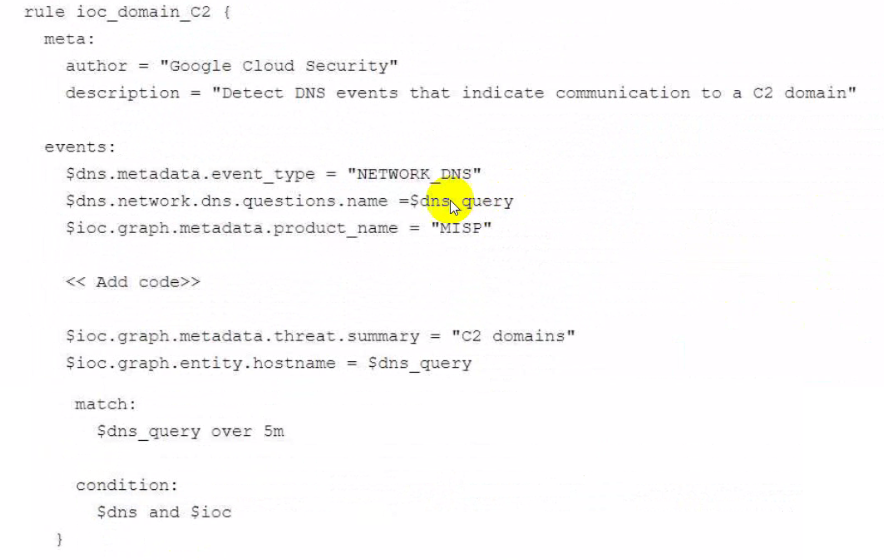
What code should you add in the detection rule to filter for the domain IOCS?

Reveal Solution Hide Solution
Correct Answer: B

This YARA-L rule is designed to correlate a real-time event (a DNS query, $dns) with known-bad indicators stored in the Google SecOps entity graph ($ioc). The code must correctly filter the entity graph to find the specific indicators from the custom MISP feed.

Two filters are required:

$ioc.graph.metadata.entity_type = 'DOMAIN_NAME': This line is essential to filter the entity graph for IoCs that are domains. The rule is trying to match a DNS query ($dns_query) to a known C2 domain, so the entity type must be DOMAIN_NAME.

$ioc.graph.metadata.source_type = 'ENTITY_CONTEXT': This is the key differentiator. The Google SecOps entity graph has multiple context sources. GLOBAL_CONTEXT (Option B) is for threat intelligence provided by Google (e.g., Google Threat Intelligence, Mandiant). DERIVED_CONTEXT (Option C) is for context inferred from UDM events. The prompt explicitly states the IoC feed is the organization's own 'threat intelligence feed... ingested... with... MISP.' This type of customer-provided, third-party intelligence is classified as ENTITY_CONTEXT. Adding this line ensures the rule only uses the custom MISP feed for its IoC data, as intended.

The other lines in the $ioc block, such as product_name = 'MISP', further refine this ENTITY_CONTEXT search.

(Reference: Google Cloud documentation, 'YARA-L 2.0 language syntax'; 'Context-aware detections with entity graph'; 'Populate the entity graph')


Unlock Premium Professional Security Operations Engineer Exam Questions with Advanced Practice Test Features:
  • Select Question Types you want
  • Set your Desired Pass Percentage
  • Allocate Time (Hours : Minutes)
  • Create Multiple Practice tests with Limited Questions
  • Customer Support
Get Full Access Now

Save Cancel