Here you can find all the free questions related with Fortinet NSE 7 - FortiSASE 25 Enterprise Administrator (NSE7_SSE_AD-25) exam. You can also find on this page links to recently updated premium files with which you can practice for actual Fortinet NSE 7 - FortiSASE 25 Enterprise Administrator Exam. These premium versions are provided as NSE7_SSE_AD-25 exam practice tests, both as desktop software and browser based application, you can use whatever suits your style. Feel free to try the Fortinet NSE 7 - FortiSASE 25 Enterprise Administrator Exam premium files for free, Good luck with your Fortinet NSE 7 - FortiSASE 25 Enterprise Administrator Exam.
Question No: 1
MultipleChoice
Refer to the exhibit.
To allow access, which web tiller configuration must you change on FortiSASE?
Options
Answer CExplanation
The exhibit indicates that the URL https://www.bbc.com/ is being blocked due to containing a banned word ('fight'). To allow access to this specific URL, you need to adjust the URL filter settings on FortiSASE.
URL Filtering:
URL filtering allows administrators to define policies that block or allow access to specific URLs or URL patterns.
In this case, the URL filter is set to block any URL containing the word 'fight.'
Modifying URL Filter:
Navigate to the Web Filter configuration in FortiSASE.
Locate the URL filter settings.
Add an exception for the URL https://www.bbc.com/ to allow access, even if it contains a banned word.
Alternatively, remove or adjust the banned word list to exclude the word 'fight' if it's not critical to the security policy.
FortiOS 7.6 Administration Guide: Provides details on configuring and managing URL filters.
FortiSASE 23.2 Documentation: Explains how to set up and modify web filtering policies, including URL filters.
Question No: 2
MultipleChoice
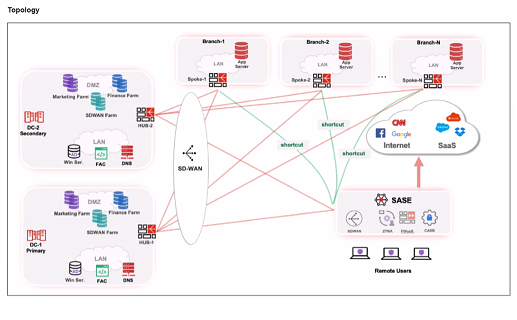
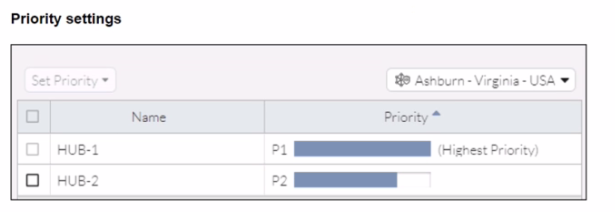
Refer to the exhibits.
When remote users connected to FortiSASE require access to internal resources on Branch-2. how will traffic be routed?
Options
Answer CExplanation
When remote users connected to FortiSASE require access to internal resources on Branch-2, the following process occurs:
SD-WAN Capability:
FortiSASE leverages SD-WAN to optimize traffic routing based on performance metrics and priorities.
In the priority settings, HUB-1 is configured with the highest priority (P1), whereas HUB-2 has a lower priority (P2).
Traffic Routing Decision:
FortiSASE evaluates the available hubs (HUB-1 and HUB-2) and selects HUB-1 due to its highest priority setting.
Once the traffic reaches HUB-1, it is then routed to the appropriate branch based on internal routing policies.
Branch-2 Access:
Since HUB-1 has the highest priority, FortiSASE directs the traffic to HUB-1.
HUB-1 then routes the traffic to Branch-2, providing the remote users access to the internal resources.
FortiOS 7.6 Administration Guide: Details on SD-WAN configurations and priority settings.
FortiSASE 23.2 Documentation: Explains how FortiSASE integrates with SD-WAN to route traffic based on defined priorities and performance metrics.
Question No: 3
MultipleChoice
An administrator must restrict endpoints from certain countries from connecting to FortiSASE. Which configuration can achieve this? (Choose one answer)
Options


Answer DExplanation
To restrict endpoints from certain countries from connecting to FortiSASE, the administrator should configure Geofencing. This feature provides granular control over which geographic locations are permitted or denied access to the SASE infrastructure.
Geofencing in FortiSASE
Geofencing is the primary mechanism for controlling remote user connectivity based on their origin.
Functionality: It uses a geography-to-IP mapping database to identify the location of incoming connection requests.
Access Modes: Administrators can choose between two main modes:
Allow: Only users from specified countries can connect; all others are blocked.
Deny: Users from specified countries are blocked; all others are allowed.
Configuration Path: In the FortiSASE GUI, navigate to Configuration > Geofencing to enable the feature and add the relevant countries.
Enforcement: Once enabled, the system automatically creates 'local-in' policies to drop or permit traffic at the edge of the SASE PoPs before it can consume resources or attempt authentication.