
Free Preparation Discussions
 MENU
MENU
Free Fortinet NSE6_OTS_AR-7.6 Exam Dumps October 2026
Here you can find all the free questions related with Fortinet NSE 6 - OT Security 7.6 Architect (NSE6_OTS_AR-7.6) exam. You can also find on this page links to recently updated premium files with which you can practice for actual Fortinet NSE 6 - OT Security 7.6 Architect Exam. These premium versions are provided as NSE6_OTS_AR-7.6 exam practice tests, both as desktop software and browser based application, you can use whatever suits your style. Feel free to try the Fortinet NSE 6 - OT Security 7.6 Architect Exam premium files for free, Good luck with your Fortinet NSE 6 - OT Security 7.6 Architect Exam.MultipleChoice
Refer to the exhibit.
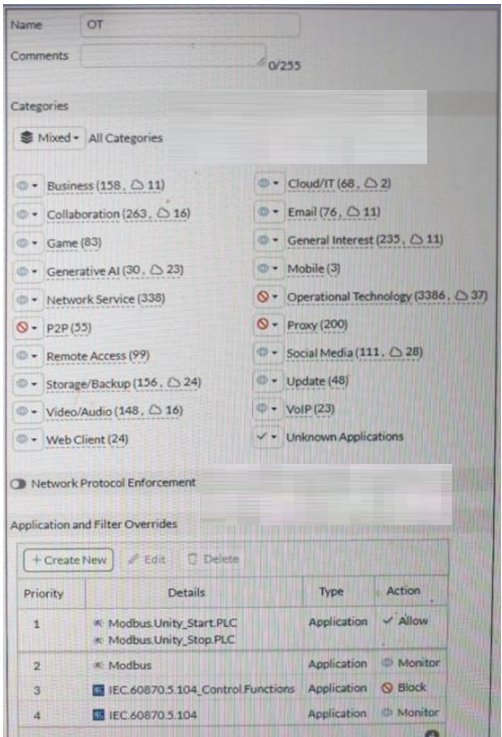
A partial Application Sensor profile is shown. When you apply this profile in a firewall policy, which two statements are correct? (Choose two answers)
OptionsMultipleChoice
Refer to the exhibit.
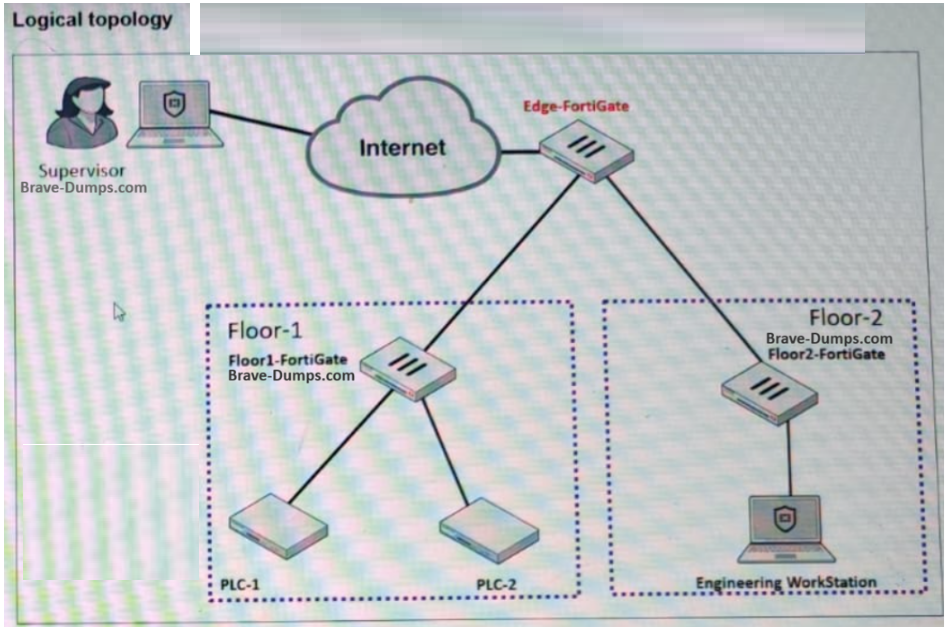
A partial OT network is shown. You want to provide the supervisor with secure remote access. Which two features can you implement on Edge-FortiGate? (Choose two answers)
OptionsMultipleChoice
Refer to the exhibit.
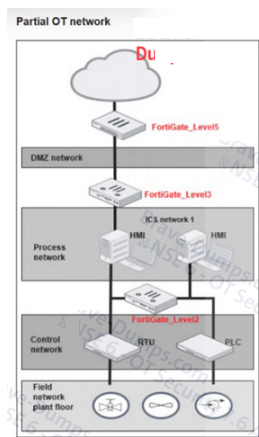
A partial OT network is shown. In this OT network, you must add additional security measures to detect OT protocols and, therefore, increase the traffic visibility. Which security sensor must you implement to detect the OT protocols in this network? (Select one answer)
OptionsMultipleChoice
For the installation of your first FortiGate device, you want to minimize the impact in your OT network. Therefore, you deploy it initially as an offline IDS. Which two statements about this deployment are correct? (Choose two answers)
OptionsMultipleChoice
Refer to the exhibits.
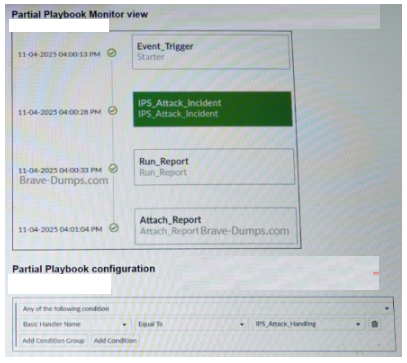
A partial view of the Playbook Monitor page and the corresponding playbook configuration are shown. Based on the monitor page and the configuration of the playbook, what has triggered the Run_Report task? (Choose one answer)
Options
