
Free Preparation Discussions
 MENU
MENU
Free Fortinet NSE5_SSE_AD-7.6 Exam Dumps September 2026
Here you can find all the free questions related with Fortinet NSE 5 - FortiSASE and SD-WAN 7.6 Core Administrator (NSE5_SSE_AD-7.6) exam. You can also find on this page links to recently updated premium files with which you can practice for actual Fortinet NSE 5 - FortiSASE and SD-WAN 7.6 Core Administrator Exam. These premium versions are provided as NSE5_SSE_AD-7.6 exam practice tests, both as desktop software and browser based application, you can use whatever suits your style. Feel free to try the Fortinet NSE 5 - FortiSASE and SD-WAN 7.6 Core Administrator Exam premium files for free, Good luck with your Fortinet NSE 5 - FortiSASE and SD-WAN 7.6 Core Administrator Exam.MultipleChoice
Refer to the exhibit, which shows the SD-WAN rule status and configuration.

Based on the exhibit, which change in the measured packet loss will make HUB1-VPN3 the new preferred member? (Choose one answer)
OptionsMultipleChoice
Which two statements correctly describe what happens when traffic matches the implicit SD-WAN rule? (Choose two answers)
OptionsMultipleChoice
Refer to the exhibit.
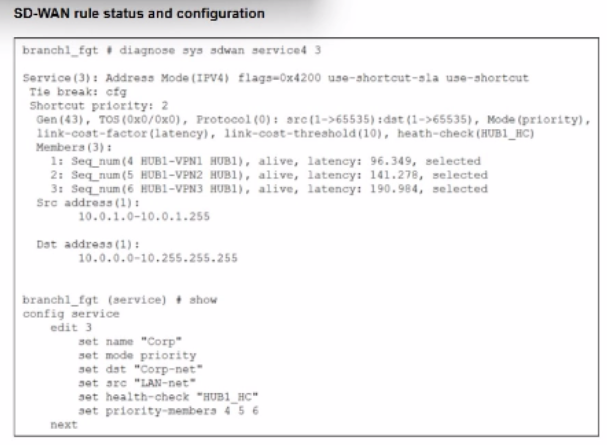
The SD-WAN rule status and configuration is shown. Based on the exhibit, which change in the measured latency will first make HUB1-VPN3 the new preferred member?
OptionsMultipleChoice
You want FortiGate to use SD-WAN rules to steer ping local-out traffic. Which two constraints should you consider? (Choose two.)
OptionsMultipleChoice
A FortiGate device is in production. To optimize WAN link use and improve redundancy, you enable and configure SD-WAN.
What must you do as part of this configuration update process? (Select one answer)
OptionsMultipleChoice
An SD-WAN member is no longer used to steer SD-WAN traffic. You want to update the SD-WAN configuration and delete the unused member.
Which action should you take first? (Select one answer)
OptionsMultipleChoice
The IT team is wondering whether they will need to continue using MDM tools for future FortiClient upgrades.
What options are available for handling future FortiClient upgrades?
Options
