
Free Preparation Discussions
 MENU
MENU
Free Fortinet FCP_FSA_AD-5.0 Exam Dumps October 2026
Here you can find all the free questions related with Fortinet NSE 5 - FortiSandbox 5.0 Administrator (FCP_FSA_AD-5.0) exam. You can also find on this page links to recently updated premium files with which you can practice for actual Fortinet NSE 5 - FortiSandbox 5.0 Administrator Exam. These premium versions are provided as FCP_FSA_AD-5.0 exam practice tests, both as desktop software and browser based application, you can use whatever suits your style. Feel free to try the Fortinet NSE 5 - FortiSandbox 5.0 Administrator Exam premium files for free, Good luck with your Fortinet NSE 5 - FortiSandbox 5.0 Administrator Exam.MultipleChoice
You are asked to configure a FortiSandbox HA cluster. Port 4 on the primary and secondary nodes is dedicated for HA-specific communication. Which command must you use to configure the secondary node? (Select one answer)
OptionsMultipleChoice
Which two statements are true about creating an API interface? (Select two answers)
OptionsMultipleChoice
You are asked to configure a FortiSandbox HA cluster. Port 4 on the primary and secondary nodes is dedicated for HA-specific communication. Which command must you use to configure the primary node? (Select one answer)
OptionsMultipleChoice
Refer to the exhibits.
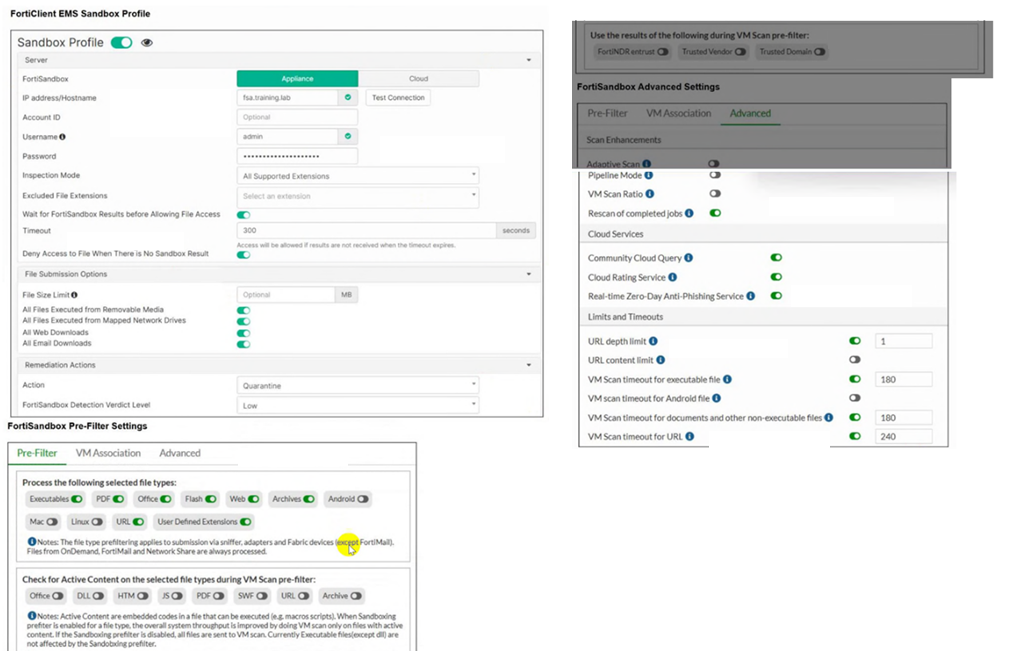
A FortiClient EMS server is integrated with a FortiSandbox device. You are asked to find ways to expedite all scan jobs that require dynamic scanning so end users do not have to wait too long for a rating on suspicious attachments and URLs. Which configuration change will maintain a high security level but expedite all dynamic scan job requests? (Select one answer)
OptionsMultipleChoice
There is a connectivity problem between FortiSandbox and the FortiGuard distribution servers. You observe that a firewall located between FortiSandbox and the internet allows traffic on ports TCP/4443, UDP/8888, and UDP/53. What is the cause of the issue? (Choose one answer)
Options
