
Free Preparation Discussions
 MENU
MENU
Fortinet NSE4_FGT_AD-7.6 Exam Questions
- Topic 1: Deployment and System Configuration: This domain covers initial FortiGate setup, logging configuration and troubleshooting, FGCP HA cluster configuration, resource and connectivity diagnostics, FortiGate cloud deployments (CNF and VM), and FortiSASE administration with user onboarding.
- Topic 2: Firewall Policies and Authentication: This domain focuses on creating firewall policies, configuring SNAT and DNAT for address translation, implementing various authentication methods, and deploying FSSO for user identification.
- Topic 3: Content Inspection: This domain addresses inspecting encrypted traffic using certificates, understanding inspection modes and web filtering, configuring application control, deploying antivirus scanning modes, and implementing IPS for threat protection.
- Topic 4: Routing: This domain covers configuring static routes for packet forwarding and implementing SD-WAN to load balance traffic across multiple WAN links.
- Topic 5: VPN: This domain focuses on implementing meshed or partially redundant IPsec VPN topologies for secure connections.
Free Fortinet NSE4_FGT_AD-7.6 Exam Actual Questions
Note: Premium Questions for NSE4_FGT_AD-7.6 were last updated On Oct. 17, 2026 (see below)
Refer to the exhibits.
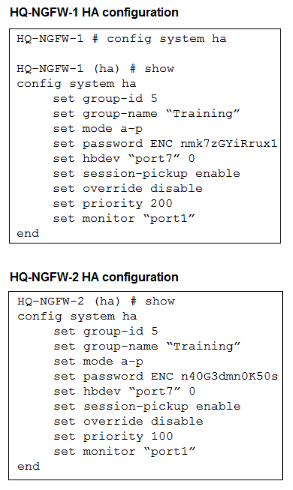
An administrator configured both members of an HA cluster at the same time. After one week of monitoring, the administrator wants to verify the HA failover performance. How can the administrator force a failover? (Choose one answer)
''This slide shows the order when the HA override setting is disabled, which is the default behavior.''
''1. The cluster compares the number of monitored interfaces that have a status of up. The member with the most available monitored interfaces becomes the primary.
2. The cluster compares the HA uptime of each member. The member with the highest HA uptime, by at least five minutes, becomes the primary.
3. The member with the highest priority becomes the primary.''
''When HA override is disabled, the HA uptime has precedence over the priority setting. This means that if you must manually fail over to a secondary device, you can do so by reducing the HA uptime of the primary FortiGate. You can do this by running the diagnose sys ha reset-uptime command on the primary FortiGate, which resets its HA uptime to 0.''
Technical Deep Dive:
The correct answer is A.
Both HA members are configured with set override disable, so FGCP does not prefer the higher-priority unit first. With override disabled, the election order is based on monitored interfaces, then HA uptime, then priority, and finally serial number. Since the cluster has been running for one week, the secondary unit will have a much higher HA uptime than a unit whose uptime is reset to zero. Therefore, if the administrator runs diagnose sys ha reset-uptime on the current primary HQ-NGFW-1, FGCP re-evaluates election and the other member can take over.
Option B is wrong because enabling override only on HQ-NGFW-2 does not by itself force an immediate clean failover in this scenario and also changes election behavior rather than performing the documented manual failover action. Option C is wrong because with override disabled, priority does not beat HA uptime. Option D can simulate a link failover, but the study guide's documented manual failover method for this exact override-disabled condition is to reset the primary's HA uptime.
Relevant CLI:
diagnose sys ha reset-uptime
get system ha status
diagnose sys ha status
This is the clean exam-aligned method to trigger a controlled HA role change.
When configuring the connection between FortiGate and FortiAnalyzer, which option indicates that reliable traffic is enabled? (Choose one answer)
''When you enable reliable logging on FortiGate, the log transport delivery method changes from UDP to TCP. TCP provides reliable data transfer, guaranteeing that the transferred data remains intact and arrives in the same order in which it was sent.''
''Optionally, if using reliable logging, you can encrypt communications using SSL-encrypted OFTP traffic, so when a log message is generated, it is safely transmitted across an unsecured network.''
Technical Deep Dive:
The correct answer is C. The study guide explicitly ties reliable logging to TCP transport and optionally to SSL-encrypted OFTP. Among the choices, the padlock icon is the only one that meaningfully indicates secure, reliable log transport behavior. A green check icon usually indicates that the FortiGate--FortiAnalyzer connection is simply up, not specifically that reliable logging is enabled. Interface status being up is unrelated, and real-time logging mode describes delivery behavior, not the reliable transport indicator itself.
So, exam-wise, the best answer is C.
From the CLI perspective, reliable logging changes the transport from UDP to TCP, and with encryption enabled it uses SSL-protected OFTP. That is why the GUI indicator associated with secure transport is the most relevant visual clue here.
An administrator has configured the following settings.
config system settings
set ses-denied-traffic enable
end
config system global
set block-session-timer 30
end
What are the two results of this configuration? (Choose two.)
''To reduce the number of log messages generated and improve performance, you can enable a session table entry of dropped traffic. This creates the denied session in the session table and, if the session is denied, all packets for that session are also denied. This ensures that FortiGate does not have to perform a policy lookup for each new packet matching the denied session, which reduces CPU usage and log generation.''
''The CLI command is ses-denied-traffic. You can also set the duration for block sessions. This determines how long a session will be kept in the session table by setting block-session-timer in the CLI. By default, it is set to 30 seconds.''
Technical Deep Dive:
The correct answers are A and B.
When set ses-denied-traffic enable is configured, FortiGate creates a session-table entry for denied traffic. That means once traffic is denied, subsequent packets that belong to the same denied flow do not need a full policy lookup again. FortiGate can drop them immediately based on the existing denied-session entry. That directly confirms B.
Because FortiGate no longer re-evaluates every repeated denied packet in the same way, the device generates fewer logs and uses less CPU for repeated denied traffic. That is exactly why A is also correct.
Why the other two are wrong:
C is incorrect because block-session-timer 30 means 30 seconds, not 30 minutes. The denied session entry is kept in the session table for that duration.
D is incorrect because these settings do not disable session helpers. They only control how denied traffic is tracked in the session table.
In operational terms, this feature is useful when a host repeatedly retries traffic that FortiGate is already denying. Instead of doing a fresh lookup for every retry, FortiGate caches the denied decision temporarily and drops the repeated packets faster.
Which two statements about equal-cost multi-path (ECMP) configuration on FortiGate are true? (Choose two answers)
''If SD-WAN is disabled, you can change the ECMP load balancing algorithm on the FortiGate CLI using the commands shown on this slide.''
''When SD-WAN is enabled, FortiOS hides the v4-ecmp-mode setting and replaces it with the load-balance-mode setting under config system sdwan. That is, when you enable SD-WAN, you control the ECMP algorithm with the load-balance-mode setting.''
''There are some differences between the two settings. The main difference is that load-balance-mode supports the volume algorithm, and v4-ecmp-mode does not.''
''These routes are called equal cost multipath (ECMP) routes...''
Technical Deep Dive:
The correct answers are A and D.
A is correct because when SD-WAN is enabled, FortiOS no longer uses v4-ecmp-mode; it uses load-balance-mode under config system sdwan. That is the explicit SD-WAN control point for ECMP behavior.
D is correct because when SD-WAN is disabled, ECMP configuration is done in the regular system routing settings, not under SD-WAN. The study guide states that you change the ECMP algorithm on the FortiGate CLI when SD-WAN is disabled, which corresponds to the classic config system settings ECMP controls.
Why the others are wrong:
B is wrong because the guide explicitly says load-balance-mode supports volume, while v4-ecmp-mode does not. So you cannot set v4-ecmp-mode to volume-based.
C is wrong because ECMP requires equal-cost routes. If distance or priority differ, they are no longer ECMP candidates; FortiGate selects the preferred route instead. The concept of ECMP itself requires equal route cost attributes.
From an implementation standpoint, the common CLI patterns are:
config system settings
set v4-ecmp-mode source-ip-based
end
and, with SD-WAN enabled:
config system sdwan
set load-balance-mode source-ip-based
end
On hardware platforms, ECMP still affects session distribution at the routing decision stage before later security services are applied. NP offload can accelerate forwarding after route selection, but the ECMP decision itself is a FortiOS control-plane routing function.
A network administrator is reviewing firewall policies in both Interface Pair View and By Sequence View. The policies appear in a different order in each view. Why is the policy order different in these two views?
In FortiOS 7.6, firewall policies can be displayed in multiple views to help administrators understand and manage rules more effectively. The difference in ordering between Interface Pair View and By Sequence View is intentional and documented.
Why the policy order is different
Interface Pair View
Groups firewall policies based on the incoming (From) and outgoing (To) interfaces.
Policies are organized under interface pairs such as:
LAN WAN
WAN LAN
Within each interface pair, policies may appear reordered compared to the global list.
This view is designed for readability and troubleshooting, not to show execution order.
By Sequence View
Displays firewall policies in their actual evaluation (processing) order.
This is the top-down order FortiGate uses when matching traffic.
It reflects the real rule sequence that determines which policy is hit first.
Why option C is correct
C . Interface Pair View sorts policies based on matching interfaces, while By Sequence View shows the actual processing order of rules.
This statement exactly matches FortiOS behavior as documented in the FortiOS 7.6 Firewall Policy Views section of the Administrator Guide.
Why the other options are incorrect
A: Interface Pair View does not follow traffic logs, and By Sequence View is not based on ''rule priority'' grouping.
B: FortiGate does not dynamically reorder policies based on traffic patterns.
D: Security levels do not affect policy ordering in Interface Pair View.
- Select Question Types you want
- Set your Desired Pass Percentage
- Allocate Time (Hours : Minutes)
- Create Multiple Practice tests with Limited Questions
- Customer Support
Maria Nelson
22 days agoHarold Edwards
1 month agoAmanda Bell
2 months agoSarah Baker
2 months agoStephen Baker
3 months agoTiffany Roberts
3 months agoTiffany Bell
4 months agoPaul Phillips
4 months agoDeborah Lopez
5 months agoAndrew Rogers
5 months agoOlivia Baker
6 months agoRachel Flores
6 months agoBetty Bell
6 months agoTiffany Walker
5 months agoTimothy Campbell
6 months agoJohn Hill
6 months agoPaz
7 months agoShaniqua
7 months agoEliseo
7 months agoAleisha
7 months agoRikki
8 months agoFanny
8 months agoLaquita
8 months agoElfrieda
8 months agoJenise
9 months agoLeota
9 months agoDarnell
9 months agoMicaela
9 months agoSusana
10 months agoSimona
10 months agoStevie
10 months ago