
Free Preparation Discussions
 MENU
MENU
Fortinet NSE7_SOC_AR-7.6 Exam - Topic 3 Question 11 Discussion
Topic #: 3
Refer to the exhibit.
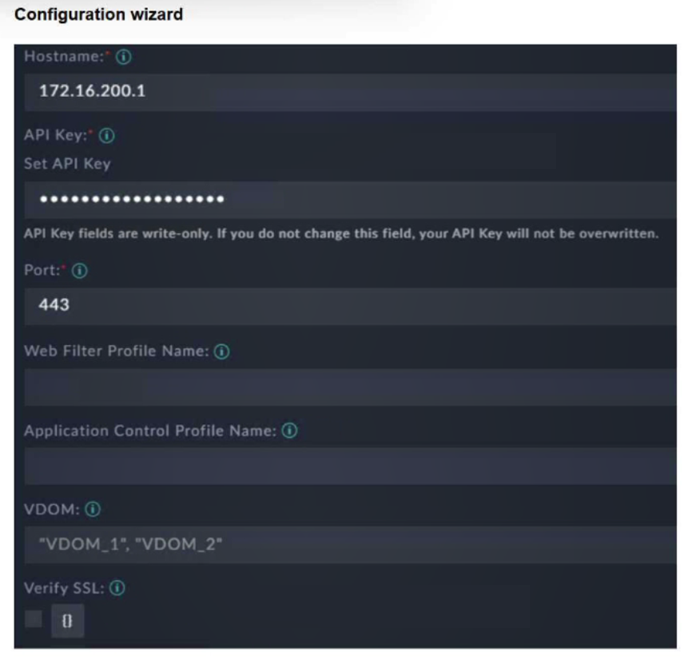
You must configure the FortiGate connector to allow FortiSOAR to perform actions on a firewall. However, the connection fails. Which two configurations are required? (Choose two answers)
Comprehensive and Detailed Explanation From FortiSOAR 7.6., FortiSIEM 7.3 Exact Extract study guide:
To establish a successful integration between FortiSOAR 7.6 and a FortiGate firewall via the FortiGate connector, specific administrative and network requirements must be met on the FortiGate side:
API Administrator and Key (D): FortiSOAR does not use standard UI login credentials. Instead, it requires a REST API Administrator account to be created on the FortiGate. This account must be assigned an administrative profile with the necessary permissions (e.g., Read/Write for Firewall policies or Address objects). Upon creation, the FortiGate generates a unique API Key, which must be entered into the 'API Key' field of the FortiSOAR configuration wizard as shown in the exhibit.
HTTPS Management Access (C): The connector communicates with the FortiGate using REST API calls over HTTPS (port 443 by default). Therefore, the physical or logical interface on the FortiGate that corresponds to the 'Hostname' IP (172.16.200.1) must have HTTPS enabled under 'Administrative Access' in its network settings. If HTTPS is disabled, the connection will time out or be refused.
Why other options are incorrect:
Trusted hosts (A): While it is a best practice to restrict API access to specific IPs (like the FortiSOAR IP), the integration can technically function without 'Trusted hosts' enabled if the network allows the traffic. However, the absence of an API key or HTTPS access will definitively cause a failure regardless of trusted host settings.
VDOM name (B): In the exhibit, the VDOM field contains multiple values ('VDOM_1', 'VDOM_2'). If VDOMs are disabled on the FortiGate, this field should generally be left blank or set to the default 'root.' Setting it specifically to 'VDOM_1' when VDOMs are disabled is not a universal requirement for connectivity; the primary handshake depends on the API key and HTTPS connectivity.
Danica
17 hours agoMarta
6 days agoLorrie
11 days agoIvette
16 days agoKaron
21 days agoIvette
27 days agoDanica
1 month agoDong
1 month agoFrederick
1 month agoNiesha
2 months agoMyra
2 months agoCarman
2 months agoErinn
2 months agoEvangelina
2 months agoJimmie
2 months agoLatrice
3 months ago