Deal of The Day! Hurry Up, Grab the Special Discount - Save 25% - Ends In 00:00:00 Coupon code: SAVE25

Free Preparation Discussions
 MENU
MENU
Fortinet NSE6_FSR_AN-7.6 Exam - Topic 2 Question 3 Discussion
Actual exam question for
Fortinet's
NSE6_FSR_AN-7.6 exam
Question #: 3
Topic #: 2
[All NSE6_FSR_AN-7.6 Questions]
Topic #: 2
Refer to the exhibit.
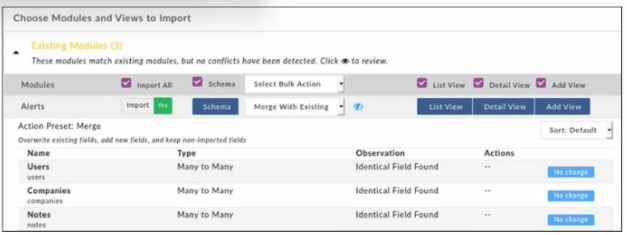
When importing modules to FortiSOAR using the configuration wizard, what actions are applied to fields it you select Merge with Existing as the Bulk action?
Suggested Answer:
D
When importing modules into FortiSOAR using the configuration wizard and selecting 'Merge with Existing' as the bulk action, the behavior for field handling is as follows: any fields that already exist in the system are overwritten with the imported values. New fields from the imported module are added to the system, while fields that are not part of the imported module remain unaffected and are retained in the system. This option ensures that existing data structures are updated with new information without losing existing, but non-imported, fields.
Currently there are no comments in this discussion, be the first to comment!