
Free Preparation Discussions
 MENU
MENU
Fortinet NSE5_FSW_AD-7.6 Exam - Topic 2 Question 9 Discussion
Topic #: 2
Refer to the exhibit.
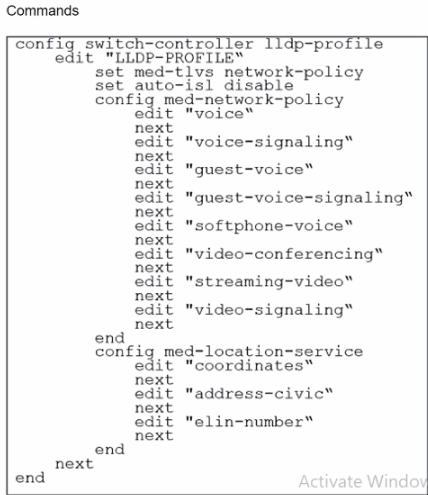
The profile shown in the exhibit is assigned to a group of managed FortiSwitch ports, and these ports are connected to endpoints which are powered by PoE.
Which configuration action can you perform on the LLDP profile to cause these endpoints to exchange PoE information and negotiate power with the managed FortiSwitch?
To cause endpoints to exchange PoE information and negotiate power with the managed FortiSwitch via LLDP, you should configure the LLDP profile to include power management in the advertised LLDP-MED TLVs. Here are the steps:
Access the LLDP Profile Configuration:Start by entering the LLDP profile configuration mode with the command:
config switch-controller lldp-profile
edit 'LLDP-PROFILE'
Enable MED-TLVs:Ensure that MED-TLVs (Media Endpoint Discovery TLVs) are enabled. These TLVs are used for extended discovery relating to network policies, including PoE, and are essential for PoE negotiation. They include power management which is crucial for the negotiation of PoE parameters between devices. The command to ensure network policies are set might look like:
set med-tlvs network-policy
Add Power Management TLV:Specifically add or ensure the power management TLV is part of the configuration. This will advertise the PoE capabilities and requirements, enabling dynamic power allocation between the FortiSwitch and the connected devices (like VoIP phones or wireless access points). This can typically be done within the network-policy settings:
config med-network-policy
edit
set poe-capability
next
end
Save and Apply Changes:Exit the configuration blocks properly ensuring changes are saved:
End
Verify Configuration:It's always good practice to verify that your configurations have been applied correctly. Use the appropriateshoworgetcommands to review the LLDP profile settings.
By adding the power management as part of LLDP-MED TLVs, the FortiSwitch will be able to communicate its power requirements and capabilities to the endpoints, thereby facilitating a dynamic power negotiation that is crucial for efficient PoE utilization.
Rory
17 hours agoBrittni
6 days agoMaryanne
11 days agoLauran
16 days agoAlonzo
21 days agoMelvin
27 days agoMaryanne
1 month agoLauran
1 month agoAlonzo
1 month agoMelvin
2 months agoIn
2 months agoDenny
2 months agoLettie
2 months agoCarman
2 months agoRutha
2 months agoDell
3 months agoMicaela
4 months agoBoris
4 months agoAdelina
5 months ago