Deal of The Day! Hurry Up, Grab the Special Discount - Save 25% - Ends In 00:00:00 Coupon code: SAVE25

Welcome to Pass4Success

- Free Preparation Discussions

Fortinet FCSS_NST_SE-7.6 Exam - Topic 3 Question 3 Discussion

Actual exam question for Fortinet's FCSS_NST_SE-7.6 exam
Question #: 3
Topic #: 3
[All FCSS_NST_SE-7.6 Questions]

Refer to the exhibits, which contain the partial configurations of two VPNs on FortiGate.
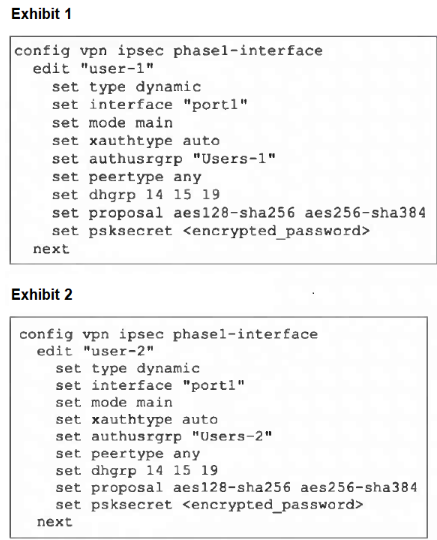
An administrator has configured two VPNs for two different user groups. Users who are in the Users-2 group are not able to connect to the VPN. After running a diagnostics command, the administrator discovers that FortiGate is not matching the user-2 VPN for members of the Users-2 group.

Which two changes must the administrator make to fix the issue? (Choose two.)

Show Suggested Answer Hide Answer
Suggested Answer: A, D

Contribute your Thoughts:

0/2000 characters
Lenita
6 days ago
Aggressive mode could speed things up, but it might compromise security. Tough choice!
upvoted 0 times
...
Alysa
12 days ago
I feel like XAuth is the most straightforward fix. Users need to authenticate properly.
upvoted 0 times
...
Melvin
17 days ago
Specific peer IDs could solve the matching issue. Definitely a good option.
upvoted 0 times
...
Aleshia
22 days ago
I agree, but what about changing to aggressive mode? Could help with connections.
upvoted 0 times
...
Mollie
27 days ago
I think enabling XAuth is crucial. It adds an extra layer of security.
upvoted 0 times
...
Nguyet
2 months ago
I agree with B, but D seems unnecessary.
upvoted 0 times
...
Anika
2 months ago
Wait, why would different pre-shared keys help?
upvoted 0 times
...
Tamesha
2 months ago
Definitely need to enable XAuth!
upvoted 0 times
...
Cheryll
2 months ago
Setting up specific peer IDs sounds like it could resolve the matching issue, but I can't recall if it's necessary for both VPNs.
upvoted 0 times
...
Laticia
2 months ago
I feel like using different pre-shared keys might not be the right answer since they usually need to match.
upvoted 0 times
...
Shawnee
2 months ago
I'm not entirely sure, but I think changing to aggressive mode could help with the connection issues. It seems familiar from practice questions.
upvoted 0 times
...
Avery
3 months ago
I remember something about XAuth being important for user authentication, so maybe option B is a good choice.
upvoted 0 times
...
Chantell
3 months ago
Wait, so the users can't connect to the VPN? That's a bummer. I bet the admin forgot to add them to the right group. Classic mistake!
upvoted 0 times
...
Marica
3 months ago
Ah, the classic VPN configuration problem. Gotta love those FortiGate devices. Definitely go with the peer IDs and XAuth, that's the way to fix this.
upvoted 0 times
...
Nada
3 months ago
Hmm, I'm not sure about the pre-shared keys. Wouldn't it be better to use certificates instead? That's more secure, right?
upvoted 0 times
...
Janine
3 months ago
Haha, aggressive mode? What is this, the 90s? Definitely go with the specific peer IDs, that's the way to go.
upvoted 0 times
...
Jarod
3 months ago
This is a pretty straightforward VPN configuration question. The issue is that the FortiGate is not matching the user-2 VPN for the Users-2 group, so the changes needed are to use different pre-shared keys (C) and set up specific peer IDs (D) on both VPNs. I feel confident I can tackle this type of question on the exam.
upvoted 0 times
...
Terrilyn
4 months ago
I think A could work too, but not sure.
upvoted 0 times
...
Bulah
4 months ago
B and D are the right moves.
upvoted 0 times
...
Vincenza
4 months ago
The issue is clearly with the VPN configuration, not the mode or pre-shared keys. Enabling XAuth and setting up specific peer IDs should do the trick.
upvoted 0 times
...
Herminia
4 months ago
Okay, I think I've got a handle on this. The question is asking for two changes the administrator needs to make to fix the issue. Based on the options provided, I'm thinking the answer is to use different pre-shared keys on both VPNs (C) and set up specific peer IDs on both VPNs (D). Those seem like the most likely solutions to the problem described.
upvoted 0 times
...
Sherita
4 months ago
Different pre-shared keys might confuse users. Better to keep them the same.
upvoted 0 times
...
Deonna
5 months ago
Hmm, this looks like a tricky one. Based on the information provided, it seems like the issue is that the FortiGate is not matching the user-2 VPN for members of the Users-2 group. I think the key is to identify the specific changes needed to fix this problem.
upvoted 0 times
...
Heike
5 months ago
I'm a bit confused by this question. It seems like there's an issue with the VPN configuration, but I'm not sure exactly what the problem is. I'll need to carefully review the exhibits and the question to try to figure out the best approach.
upvoted 0 times
Jose
1 day ago
I think enabling XAuth could help with the user group issue.
upvoted 0 times
...
...

Save Cancel