
Free Preparation Discussions
 MENU
MENU
Fortinet FCSS_NST_SE-7.6 Exam - Topic 2 Question 14 Discussion
Topic #: 2
Refer to the exhibit.
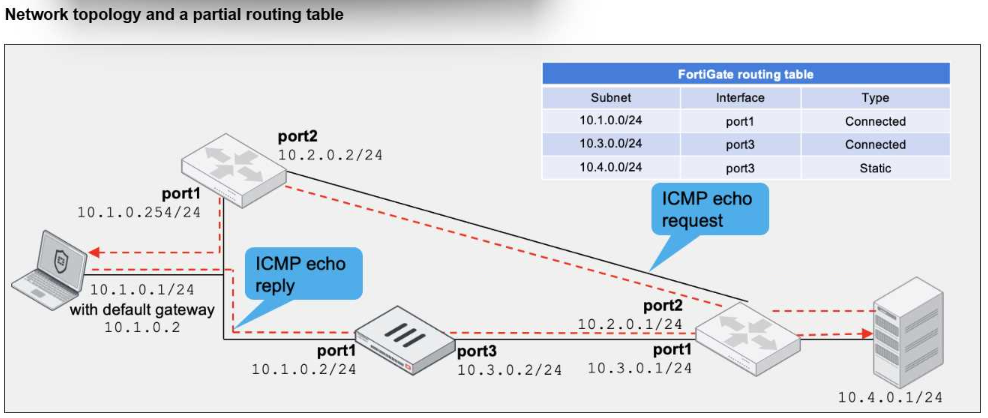
A network topology and a partial routing table are shown.
FortiGate has already been configured with a firewall policy that allows all ICMP traffic to flow from port1 to port3.
Which two changes can the administrator perform to ensure the server at 10.4.0.1/24 receives the ICMP echo reply from the laptop at 10.1.0.1/24? (Choose two.)
The correct answers are A and C.
The study guide describes this exact asymmetric ICMP scenario. It states:
''The server sends an echo request to the PC through port2 of the local router, effectively bypassing FortiGate. When it receives the echo request, the PC responds with an echo reply through its default gateway, 10.1.0.2, which is port1 on FortiGate. Because there is no existing session, the echo reply is dropped. All subsequent echo replies are blocked.''
That means the current problem exists because:
the ICMP request bypasses FortiGate
the ICMP reply goes through FortiGate
FortiGate has no matching session, so it drops the reply
The study guide then shows the exact corrective option:
''Allowing asymmetric routing:''
config system settings
set asymroute enable
end
It further explains:
''After the packet passes through the FortiGate CPU, FortiGate forwards the packet using the FIB, even though there are no session matches. FortiGate forwards all subsequent echo replies using the FIB.''
So A is correct.
The other valid fix is to make the traffic symmetric by changing the laptop's default gateway so the reply no longer goes through FortiGate. In the exhibit, the alternate gateway is 10.1.0.254, which is the local router on the same subnet. If the laptop uses 10.1.0.254 instead of 10.1.0.2, the ICMP echo reply follows the same bypass path as the echo request, so the server receives it without involving FortiGate session validation. This makes C correct.
Why the other options are wrong:
B is wrong because this is not an RPF problem. The study guide explains RPF as a reverse path lookup used to validate whether a packet arrived on a legitimate interface, mainly for spoofing protection. The issue in this scenario is a missing session due to asymmetric routing, not a strict-versus-feasible RPF failure
D is wrong because FortiGate already has the specific route 10.4.0.0/24 through port3 in the routing table shown in the exhibit, so adding a default static route to port3 is unnecessary and not the reason the echo reply is being dropped
So the verified answers are: A, C.
Currently there are no comments in this discussion, be the first to comment!