
Free Preparation Discussions
 MENU
MENU
Fortinet FCP_FMG_AD-7.6 Exam - Topic 2 Question 16 Discussion
Topic #: 2
Refer to the exhibits.
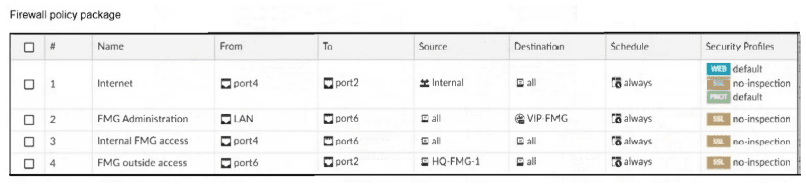
An administrator must replace the source LAN interface in policy ID 2 on their FortiGateRugged-70F.
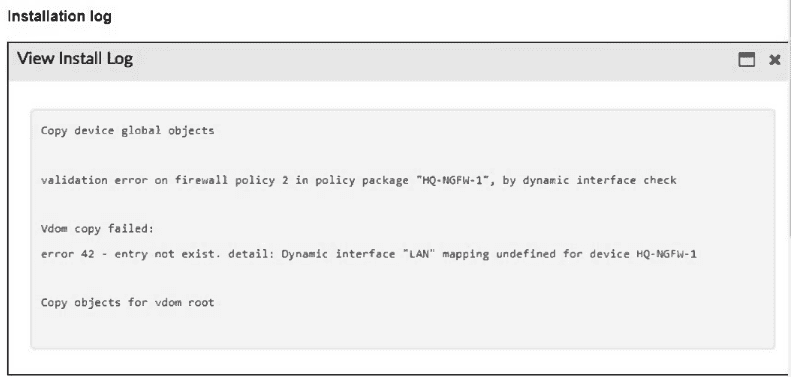
However, when they try to install the policy package, they receive the error shown in the exhibit.
What should the administrator do to resolve the error?
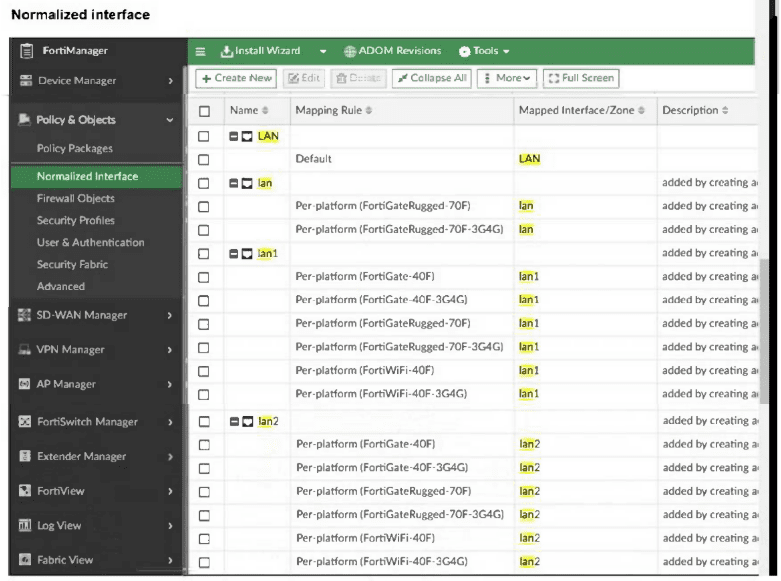
The correct answer is C. The installation log explicitly says: ''Dynamic interface 'LAN' mapping undefined for device HQ-NGFW-1''. That means the policy is using a normalized interface, but FortiManager has no valid mapping for that device. The FortiManager 7.6 Administrator Study Guide states that ''Interfaces are mapped per device, per platform, or both'' and ''When the normalized interface is used in a policy, the per-device mappings have higher priority than per-platform mappings.''
The lab guide also shows that during import or policy mapping fixes, the administrator can set the Mapping Type to Per-Device for interfaces.
So the correct fix is to create a per-device mapping for the normalized interface LAN for that FortiGateRugged-70F. Hardcoding lan1 in the policy is not the best FortiManager method because interface mapping is designed specifically to avoid that.
=========
Carman
2 days agoYuriko
7 days agoLuisa
12 days agoCarli
17 days agoMarkus
23 days agoDaniel
28 days agoLenora
1 month ago