
Free Preparation Discussions
 MENU
MENU
Fortinet FCP_FCT_AD-7.4 Exam - Topic 1 Question 8 Discussion
Topic #: 1
Refer to the exhibit.
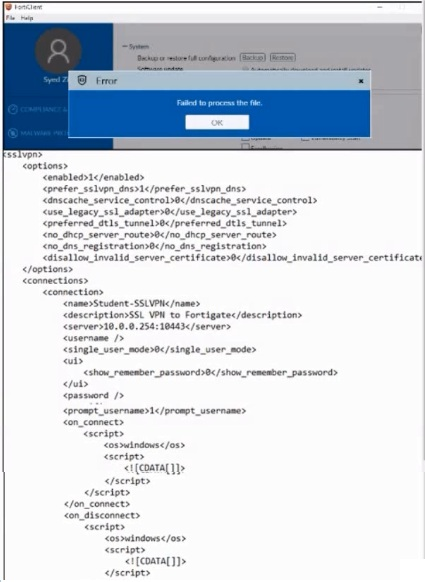
An administrator has restored the modified XML configuration file to FortiClient and sees the error shown in the exhibit.
Based on the XML settings shown in the exhibit, what must the administrator do to resolve the issue with the XML configuration file?
Based on the error message and the XML configuration file shown in the exhibit:
The error 'Failed to process the file' typically indicates an issue with the XML syntax.
Upon reviewing the XML content, it is crucial to ensure that all tags are correctly formatted, properly opened and closed, and that there are no syntax errors.
Resolving any XML syntax errors will allow FortiClient to successfully process and restore the configuration file.
Therefore, the administrator must resolve the XML syntax error to fix the issue.
Reference
FortiClient EMS 7.2 Study Guide, Configuration File Management Section
General XML Syntax Guidelines and Best Practices
Shawna
11 days agoTresa
16 days agoLemuel
21 days agoLashaunda
27 days agoTalia
1 month agoChanel
1 month agoEmilio
1 month agoLouvenia
2 months agoKelvin
2 months agoWilbert
2 months agoAlaine
2 months agoKristine
2 months agoAmos
2 months agoCathrine
3 months agoAvery
4 months agoLazaro
4 months agoDawne
5 months agoAntonio
5 months agoSanda
5 months agoGraciela
5 months ago