
Free Preparation Discussions
 MENU
MENU
Databricks Certified Data Engineer Professional Exam Questions
- Topic 1: Databricks Tooling: The Databricks Tooling topic encompasses the various features and functionalities of Delta Lake. This includes understanding the transaction log, Optimistic Concurrency Control, Delta clone, indexing optimizations, and strategies for partitioning data for optimal performance in the Databricks SQL service.
- Topic 2: Data Processing: The topic covers understanding partition hints, partitioning data effectively, controlling part-file sizes, updating records, leveraging Structured Streaming and Delta Lake, implementing stream-static joins and deduplication. Additionally, it delves into utilizing Change Data Capture and addressing performance issues related to small files.
- Topic 3: Data Modeling: It focuses on understanding the objectives of data transformations, using Change Data Feed, applying Delta Lake cloning, designing multiplex bronze tables. Lastly it discusses implementing incremental processing and data quality enforcement, implementing lookup tables, and implementing Slowly Changing Dimension tables, and implementing SCD Type 0, 1, and 2 tables.
- Topic 4: Security & Governance: It discusses creating Dynamic views to accomplishing data masking and using dynamic views to control access to rows and columns.
- Topic 5: Monitoring & Logging: This topic includes understanding the Spark UI, inspecting event timelines and metrics, drawing conclusions from various UIs, designing systems to control cost and latency SLAs for production streaming jobs, and deploying and monitoring both streaming and batch jobs.
- Topic 6: Testing & Deployment: It discusses adapting notebook dependencies to use Python file dependencies, leveraging Wheels for imports, repairing and rerunning failed jobs, creating jobs based on common use cases, designing systems to control cost and latency SLAs, configuring the Databricks CLI, and using the REST API to clone a job, trigger a run, and export the run output.
Free Databricks Databricks Certified Data Engineer Professional Exam Actual Questions
Note: Premium Questions for Databricks Certified Data Engineer Professional were last updated On Sep. 19, 2026 (see below)
Given the following error traceback (from display(df.select(3*"heartrate"))) which shows AnalysisException: cannot resolve 'heartrateheartrateheartrate', which statement describes the error being raised?
Exact extract: ''select() expects column names or Column expressions.''
===========
A data engineer is developing a Lakeflow Declarative Pipeline (LDP) using a Databricks notebook directly connected to their pipeline. After adding new table definitions and transformation logic in their notebook, they want to check for any syntax errors in the pipeline code without actually processing data or running the pipeline.
How should the data engineer perform this syntax check?
Databricks provides a ''Validate'' option within the Lakeflow Declarative Pipeline development interface that checks pipeline configurations, transformations, and syntax errors before actual execution.
This feature parses and validates the pipeline logic defined in notebooks or workspace files to ensure correctness and consistency of table dependencies, DLT (Delta Live Table) syntax, and schema references.
The validation process does not process or move any data, making it ideal for testing new configurations before deployment.
Using the shell terminal (B) or workspace files (D) does not perform integrated pipeline-level validation, while reconnecting to compute clusters (C) is unrelated to syntax checks. Therefore, the verified and correct approach is A.
A data engineer is configuring Delta Sharing for a Databricks-to-Databricks scenario to optimize read performance. The recipient needs to perform time travel queries and streaming reads on shared sales data.
Which configuration will provide the optimal performance while enabling these capabilities?
The official Delta Sharing guidance specifies that in order for recipients to use time travel queries and streaming reads, providers must share Delta tables WITH HISTORY. Sharing history ensures the Delta log is included, which enables efficient access to table snapshots and incremental data streams. Additionally, Change Data Feed (CDF) must be enabled prior to sharing if downstream consumers require streaming CDC queries. Without history, recipients cannot perform time travel or streaming queries. Open sharing supports static Delta tables but lacks streaming support. Therefore, sharing tables WITH HISTORY and enabling CDF is the required configuration for both performance and functionality.
A junior data engineer has been asked to develop a streaming data pipeline with a grouped aggregation using DataFrame df. The pipeline needs to calculate the average humidity and average temperature for each non-overlapping five-minute interval. Events are recorded once per minute per device.
Streaming DataFrame df has the following schema:
"device_id INT, event_time TIMESTAMP, temp FLOAT, humidity FLOAT"
Code block:
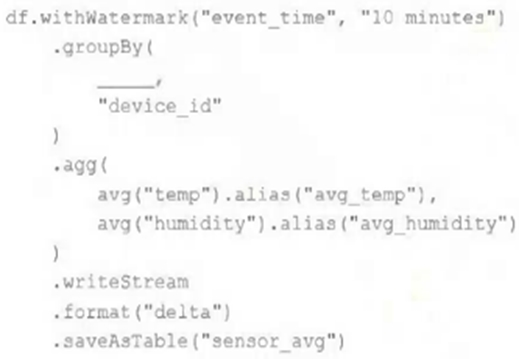
Choose the response that correctly fills in the blank within the code block to complete this task.
This is the correct answer because the window function is used to group streaming data by time intervals. The window function takes two arguments: a time column and a window duration. The window duration specifies how long each window is, and must be a multiple of 1 second. In this case, the window duration is ''5 minutes'', which means each window will cover a non-overlapping five-minute interval. The window function also returns a struct column with two fields: start and end, which represent the start and end time of each window. The alias function is used to rename the struct column as ''time''. Verified Reference: [Databricks Certified Data Engineer Professional], under ''Structured Streaming'' section;Databricks Documentation, under ''WINDOW'' section. https://www.databricks.com/blog/2017/05/08/event-time-aggregation-watermarking-apache-sparks-structured-streaming.html
Which statement describes integration testing?
This is the correct answer because it describes integration testing. Integration testing is a type of testing that validates interactions between subsystems of your application, such as modules, components, or services. Integration testing ensures that the subsystems work together as expected and produce the correct outputs or results. Integration testing can be done at different levels of granularity, such as component integration testing, system integration testing, or end-to-end testing. Integration testing can help detect errors or bugs that may not be found by unit testing, which only validates behavior of individual elements of your application. Verified Reference: [Databricks Certified Data Engineer Professional], under ''Testing'' section; Databricks Documentation, under ''Integration testing'' section.
- Select Question Types you want
- Set your Desired Pass Percentage
- Allocate Time (Hours : Minutes)
- Create Multiple Practice tests with Limited Questions
- Customer Support
John Phillips
1 day agoJeffrey Flores
1 month agoOlivia Evans
2 months agoMargaret Stewart
3 months agoEmi Jeong
7 days agoData Processing Johnson
4 months agoDatabricks Tooling Anderson
2 months agoEmily Campbell
4 months agoData Modeling Johnson
5 months agoData Processing Garcia
4 months agoDatabricks Tooling Thompson
4 months agoSteven Adams
5 months agoMichael Flores
5 months agoRyan Bell
5 months agoCrystal Brown
5 months agoGary Walker
5 months agoDonald Collins
5 months agoAlishia
6 months agoDulce
6 months agoPearlie
6 months agoEvelynn
7 months agoYoko
7 months agoLouvenia
7 months agoGlory
8 months agoMona
8 months agoMattie
8 months agoLavonda
8 months agoAntonio
8 months agoBillye
9 months agoRosio
9 months agoKimbery
9 months agoNoe
9 months agoSharen
10 months agoMitsue
10 months agoLacresha
10 months agoDomitila
10 months agoCassi
11 months agoChau
11 months agoNadine
11 months agoSharee
11 months agoNiesha
12 months agoMary
12 months agoMing
1 year agoDante
1 year agoMargot
1 year agoLindsey
1 year agoRyan
1 year agoFernanda
1 year agoStacey
1 year agoRosann
1 year agoMarti
1 year agoEllen
1 year agoEmmett
1 year agoCherry
1 year agoAlana
1 year agoJovita
2 years agoBeatriz
2 years agoLeslie
2 years agoMichael
2 years agoLaurena
2 years agoRemedios
2 years agoDana
2 years agoBrittni
2 years agoLaurel
2 years agoNidia
2 years agoLezlie
2 years agoDana
2 years agoRenato
2 years agoYaeko
2 years agoDean
2 years agoSon
2 years agoAlex
2 years agoEffie
2 years agoMaybelle
2 years agoStefany
2 years agoHeike
2 years agoGearldine
2 years agoMisty
2 years agoCharlesetta
2 years agoAlesia
2 years agoAretha
2 years agoGary
2 years agoMozell
2 years agoSharen
2 years agoIsabella
2 years agoSheridan
2 years agoAdolph
2 years agoJaime
2 years agoElmira
2 years agoJesusita
2 years agoRichelle
2 years agoDenny
2 years agoAlysa
2 years agoHerman
2 years agoThad
2 years ago