
Free Preparation Discussions
 MENU
MENU
CompTIA XK0-006 Exam Questions
Free CompTIA XK0-006 Exam Actual Questions
Note: Premium Questions for XK0-006 were last updated On Oct. 04, 2026 (see below)
A systems administrator is having issues with a third-party API endpoint. The administrator receives the following output:
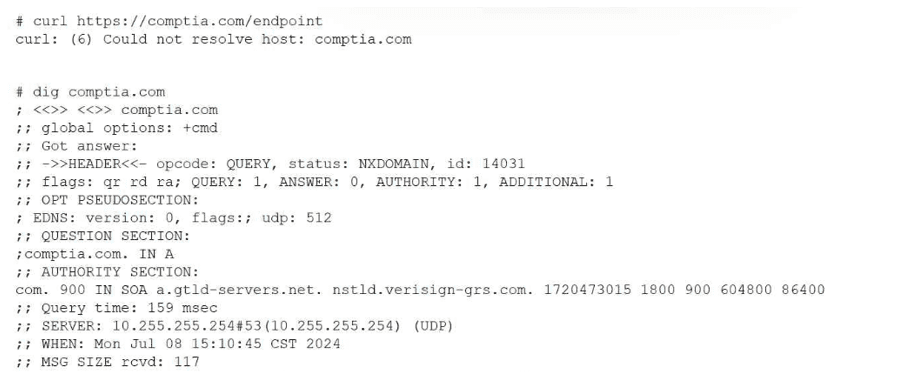
Which of the following actions should the administrator take to resolve the issue?
This scenario represents a name resolution failure, which is a common troubleshooting case addressed in CompTIA Linux+ V8. The critical clues are the error messages returned by both curl and dig.
The curl error ''Could not resolve host'' indicates that the system is unable to translate the hostname into an IP address. This is confirmed by the dig output, which returns NXDOMAIN, meaning the DNS resolver cannot resolve the requested domain name. Importantly, the dig output shows that the query is reaching a DNS server (10.255.255.254), but the resolution fails, strongly pointing to a DNS client configuration issue.
Option C, reviewing and fixing the DNS client configuration file (such as /etc/resolv.conf or systemd-resolved settings), is the correct action. Linux+ V8 documentation highlights DNS misconfiguration as a primary cause of application connectivity issues. Incorrect nameserver entries, unreachable DNS servers, or misconfigured resolvers commonly produce NXDOMAIN responses.
The other options are incorrect. Firewall issues would result in connection timeouts, not DNS resolution failures. Requesting a new API endpoint is unnecessary without first confirming local DNS functionality. Internet connectivity issues would typically prevent any DNS communication, but here a DNS server is clearly being contacted.
Linux+ V8 stresses a layered troubleshooting approach: verify DNS resolution before investigating network ports or application logic. Therefore, the correct answer is C. Review and fix the DNS client configuration file.
(Partial question reconstructed from visible content)
The correct answer is C. pam.conf because it is directly associated with Pluggable Authentication Modules (PAM), which provide a flexible framework for authentication in Linux systems. PAM allows administrators to configure authentication policies independently from applications, enabling centralized control over login mechanisms, password policies, and account restrictions.
The /etc/pam.conf file (or more commonly the /etc/pam.d/ directory in modern systems) defines how authentication is handled for various services such as login, SSH, sudo, and others. Each PAM configuration specifies modules that perform authentication, account validation, password management, and session handling. This modular approach enhances security and flexibility, allowing administrators to enforce consistent authentication rules across multiple services.
Option D (smb.conf) is incorrect because it is the configuration file for Samba, which is used for file sharing and interoperability between Linux and Windows systems. It does not control system authentication policies at the OS level.
From a Linux+ security perspective, understanding PAM is critical because it governs how users authenticate and how access is controlled. Misconfiguration of PAM files can lead to authentication failures or security vulnerabilities. Therefore, administrators must carefully manage PAM configurations to ensure secure and reliable access control across the system.
If you upload the full top part, I can 100% confirm the exact original wording---but based on Linux+ standards, C is definitively correct.
An administrator is investigating the reason a Linux workstation is not resolving the website http://www.comptia.org. The administrator executes some commands and receives the following output:
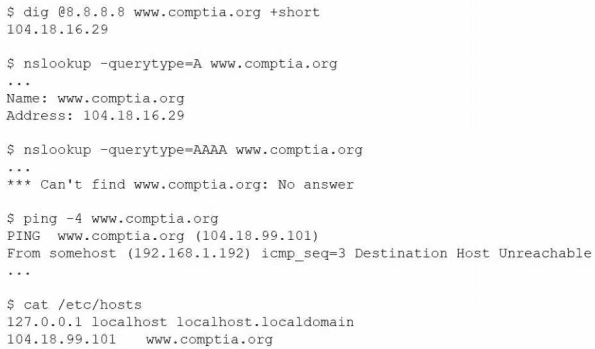
Which of the following is the most likely cause?
When troubleshooting name resolution issues in Linux, /etc/hosts entries take precedence over DNS lookups. The workstation's /etc/hosts file contains the line:
CopyEdit
104.18.99.101 www.comptia.org
This means any attempt to access www.comptia.org will resolve to 104.18.99.101, regardless of the real DNS response. However, both dig and nslookup show the correct IP as 104.18.16.29. Because the local /etc/hosts entry overrides DNS, and the hardcoded IP is either incorrect or unreachable, all network traffic to www.comptia.org will fail or not reach the intended destination, resulting in the observed connectivity issue (Destination Host Unreachable).
Other options:
B . The lack of IPv6 support is irrelevant since the host is using IPv4 and the DNS queries for IPv4 (A record) are successful.
C . The firewall would block all HTTP/HTTPS connections, but the error shown is a host unreachable, not a port-specific issue.
D . The nameserver is working; both dig and nslookup queries succeed and return the correct A record.
CompTIA Linux+ Study Guide: Exam XK0-006, Sybex, Chapter 8: 'Networking Fundamentals', Section: 'Troubleshooting Name Resolution'
CompTIA Linux+ XK0-006 Objectives, Domain 2.0: Networking
A Linux software developer wants to use AI to optimize source code used in a commercial product. Which of the following steps should the developer take first?
Linux+ V8 emphasizes security, compliance, and governance when introducing new automation technologies, including AI. Before using AI tools to optimize commercial source code, the developer must ensure that such usage complies with organizational policies.
Option B is correct because verifying company policy is the first and most critical step. AI tools may introduce risks such as intellectual property leakage, licensing conflicts, or regulatory violations. Many organizations restrict how source code can be shared with external systems, including AI services.
The other options are premature. Selecting tools or deploying models should only occur after policy approval. Linux+ V8 highlights governance-first approaches when adopting automation technologies.
Therefore, the correct answer is B.
A user reports recurrent issues with an application, which is currently operational. The systems administrator gathers the following outputs to diagnose the issue:
Out of memory: Kill process (mariadb)
Killed process (mariadb)
mariadb invoked oom-killer
egrep 'Out of memory' /var/log/messages
Multiple entries showing mariadb being killed by OOM killer
free -m
Mem: total 15819, used 10026, free 5174, available 5134
Swap: 0 0 0
sar -r
kbmemused ~67%, no swap usage
Which of the following is a possible cause of this issue?
The correct answer is D. The process is showing signs of a memory leak because the logs clearly indicate repeated activation of the OOM (Out Of Memory) killer, specifically targeting the mariadb process. The OOM killer is triggered when the Linux kernel determines that the system is running critically low on memory and must terminate processes to maintain system stability.
The repeated log entries showing mariadb invoked oom-killer and multiple instances of the process being killed strongly suggest that this application is consuming increasing amounts of memory over time without releasing it properly. This is a classic symptom of a memory leak, where an application continuously allocates memory but fails to free it, eventually exhausting available system resources.
The free -m output shows that while there is still some free memory, swap space is completely unused (0 total). This means the system has no fallback memory, making it more susceptible to OOM conditions. However, the absence of swap alone does not explain why a specific process is repeatedly being killed.
Option A is incorrect because there is no indication of a backup process consuming memory. Option B is incorrect because the system is not using swap at all. Option C is incorrect because cached memory is reclaimable by the kernel and does not typically trigger the OOM killer.
From a Linux+ troubleshooting perspective, identifying repeated OOM events tied to a specific process is a strong indicator of inefficient memory handling or a memory leak. Administrators should investigate the application, apply updates or patches, or restart the service periodically while implementing proper monitoring and possibly adding swap space as a temporary mitigation.
- Select Question Types you want
- Set your Desired Pass Percentage
- Allocate Time (Hours : Minutes)
- Create Multiple Practice tests with Limited Questions
- Customer Support
Gerald Thompson
15 days agoBrenda Moore
1 month agoElizabeth Green
2 months agoWilliam Davis
2 months agoRyan Rodriguez
3 months agoDonald Johnson
3 months agoSharon Hernandez
4 months agoKevin Martin
4 months agoCarol Cooper
5 months agoMark Johnson
5 months agoSandra Young
6 months agoBetty Cooper
5 months agoSarah Perez
6 months agoJustin Parker
5 months agoJustin King
5 months agoMichael Gonzalez
5 months agoAlbina
6 months agoRaul
7 months agoGilma
7 months agoMelodie
7 months agoRosio
7 months ago