Deal of The Day! Hurry Up, Grab the Special Discount - Save 25% - Ends In 00:00:00 Coupon code: SAVE25
Welcome to Pass4Success

- Free Preparation Discussions

Cisco 350-501 Exam - Topic 2 Question 92 Discussion

Posted by Carolann on Jul 10, 2024 at 09:23 PM

After implement MPLS protocol for multiple VRFs on a single Cisco device, the engineer notices all VRFs on the router still do to not LDP session protection feature enabled. Which configuration must the engineer apply to enable the LDP session protection feature FOR LDP neighbors within each VRF?

Suggested Answer: A

SOLUTION:-

R1

Config t

router isis 1

net 49.0001.0010.0001.0101.00

area-password C1sc0!

int et0/0

ip router isis 1

isis authen mode text level-2

isis circuit-type level-2

isis tag 1

int et1/0

ip router isis 1

isis authen mode text level-2

isis circuit-type level-2

isis tag 1

R2

router isis 2

net 49.0001.0010.0002.0202.00

area-password C1sc0!

int et0/0

ip router isis 2

isis authen mode text level-2

isis circuit-type level-2

isis tag 2

int et1/0

ip router isis 2

isis authen mode text level-1

isis circuit-type level-1

isis tag 2

R3

router isis 3

net 49.0001.0010.0003.0303.00

area-password C1sc0!

int et0/0

ip router isis 3

isis authen mode text level-1

isis circuit-type level-1

isis tag 3

int et1/0

ip router isis 3

isis authen mode text level-2

isis circuit-type level-2

isis tag 3

R1 Verification: -

R1

Config t

Ipv6 unicast-routing

Router isis 1

Metric-style wide

Address-family ipv6 unicast

Multi-topology

Int loop0

Ip router isis 1

Ipv6 router isis 1

Isis tag 1

Int et0/0

Ipv6 router isis 1

Int et1/0

Ipv6 router isis 1

R2

Config t

Ipv6 unicast-routing

Router isis 2

Metric-style wide

Address-family ipv6 unicast

Multi-topology

Int loop0

Ip router isis 2

Ipv6 router isis 2

Isis tag 2

Int et0/0

Ipv6 router isis 2

Int et1/0

Ipv6 router isis 2

R3

Config t

Ipv6 unicast-routing

Router isis 3

Metric-style wide

Address-family ipv6 unicast

Multi-topology

Int loop0

Ip router isis 3

Ipv6 router isis 3

Isis tag 3

Int et0/0

Ipv6 router isis 3

Int et1/0

Ipv6 router isis 3

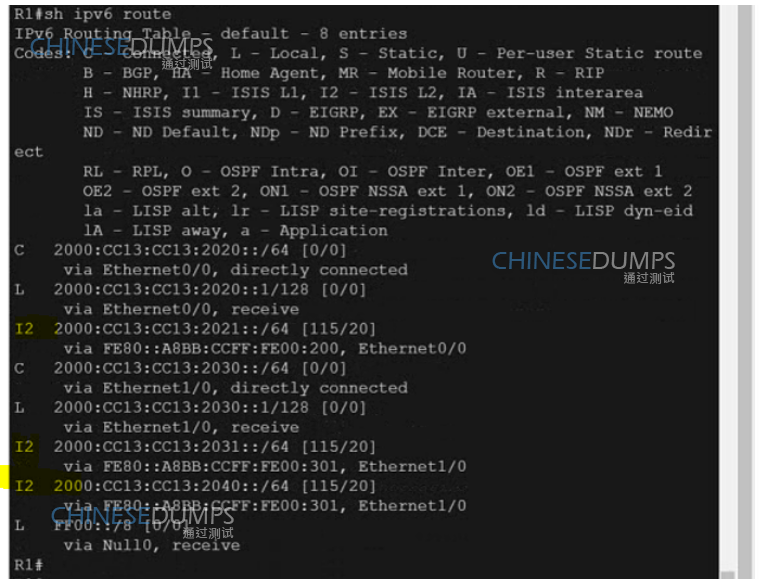
R1 Ipv6 Verification: -

R1

Copy run start

R2

Copy run start

R3

Copy run start


Get Premium 350-501 Questions as Interactive Web-Based Practice Test or PDF Real Exam Format Detailed Explanations Instant Access Get Your Practice Test
37 comments · newest first
LI
Lisha 11 months ago
Really? I thought LDP session protection was automatic with MPLS.
BU
Bulah 11 months ago
Nah, global config won't cut it, gotta do it in the VRFs.
HU
Huey 11 months ago
Wait, does that mean we have to do it for each neighbor too?
XE
Xenia 11 months ago
I think it's option D for sure!
LO
Lorrine 12 months ago
LDP session protection needs to be configured per VRF.
CO
Cora 12 months ago
I believe the right answer is to configure LDP session protection within the individual VRFs, which sounds like option D. That seems to make the most sense to me.
TE
Tequila 1 year ago
I’m a bit confused about whether LDP session authentication is related to session protection. I feel like it might be option C, but I’m not confident.
MI
Michell 1 year ago
I think I practiced a question similar to this, and it mentioned configuring it globally as well as per neighbor. Could that be option B?
KE
Kenneth 1 year ago
I remember something about needing to configure LDP session protection within each VRF, but I'm not entirely sure if that's the only step needed.
LA
Lai 1 year ago
Based on the question, it seems like we need to enable the LDP session protection feature for the LDP neighbors within each VRF. So the correct answer would be to configure it within the individual VRFs, not globally. Option D is the way to go.
BL
Blondell 1 year ago
I'm a bit confused on the difference between configuring LDP session protection globally versus per-VRF. I'll need to review the MPLS and VRF concepts to make sure I understand this properly.
FR
Frankie 1 year ago
Okay, I think I've got this. The key is to configure the LDP session protection within the individual VRFs, not globally. Option D seems to be the right answer.
DO
Dorothy 1 year ago
Hmm, this looks like a tricky one. I'll need to think carefully about the different configuration options and how they apply to the VRFs.
MA
Mattie 1 year ago
Ah, I see now. The question is specifically asking about enabling the LDP session protection feature for the LDP neighbors within each VRF. So the right approach would be to configure it per-VRF, as indicated in option D.
BR
Brandon 1 year ago
I'm a little confused by the requirement to have three different Citrix Workspace app for Web sites. Wouldn't it be simpler to just have one Workspace app for Web site and configure the different branding and SSL certificates there? I'll need to think through the pros and cons of each approach.
DO
Dorothea 1 year ago
I'm feeling pretty confident about this one. The data seems straightforward, and I have a good strategy for calculating the impact of the maintenance costs and potential savings.
MA
Maryann 1 year ago
I'm a little confused by the wording of the question. What exactly do they mean by "the FIRST action"? Does that mean we can't do anything else besides that one thing? I'll have to re-read it carefully.
KE
Kelvin 1 year ago
Maybe the engineer should try turning it off and on again? Or how about a good old-fashioned percussive maintenance?
KE
Kenny 1 year ago
↳ replying to Kelvin
D) Configure LDP session protection within the individual VRFs.
CH
Charlesetta 1 year ago
↳ replying to Kelvin
B) Configure LDP session protection globally on the device and on each neighbor that requires session protection.
CO
Cordelia 1 year ago
↳ replying to Kelvin
A) Configure LDP session protection globally on the device only.
SA
Samira 1 year ago
Configuring LDP session protection globally? That's like trying to herd cats. D is the only option that makes sense.
SH
Shawnda 1 year ago
If I had a penny for every time I've seen this kind of question, I'd be a millionaire! D is the way to go.
EL
Eleonora 1 year ago
↳ replying to Shawnda
Yes, D is the way to go to ensure LDP session protection is enabled for each VRF on the router.
JI
Jin 1 year ago
↳ replying to Shawnda
I think D makes the most sense in this scenario, it's important to configure it within the individual VRFs.
SH
Sheridan 1 year ago
↳ replying to Shawnda
I agree, D is the correct option for enabling LDP session protection within each VRF.
TA
Tammy 1 year ago
Hah, the engineers must have been napping when they configured this. D is definitely the right answer here.
IN
Inocencia 1 year ago
↳ replying to Tammy
Definitely, configuring LDP session protection within the individual VRFs is the best practice in this scenario.
BE
Belen 1 year ago
↳ replying to Tammy
It's important to make sure each VRF has its own LDP session protection configured.
VI
Vilma 1 year ago
↳ replying to Tammy
Agreed, D is the way to go for enabling LDP session protection within each VRF.
MA
Maile 1 year ago
Wow, this question is tricky! I think the answer is D, since session protection has to be configured within each VRF, not globally.
AL
Alecia 2 years ago
I believe configuring LDP session protection within the individual VRFs is the best option. It provides more granular control and security.
BA
Barabara 2 years ago
I agree with Allene. It's important to have protection for each neighbor to ensure secure communication.
AL
Allene 2 years ago
I think we should configure LDP session protection globally on the device and on each neighbor that requires session protection.
JO
Joni 2 years ago
But wouldn't it be easier to just configure it globally on the device and on each neighbor that requires session protection?
BO
Bo 2 years ago
I agree with Allene, configuring it within the VRFs seems like the best option.
AL
Allene 2 years ago
I think we should configure LDP session protection within the individual VRFs.
0/2000 characters

Save Cancel