
 MENU
MENU
A new project called ''device_status'' must be stored in a central Git repository called ''device_status'' with the first file named ''device_status.py''. The Git repository is created using the account python_programmer. Which set of commands inserts the project into Git?
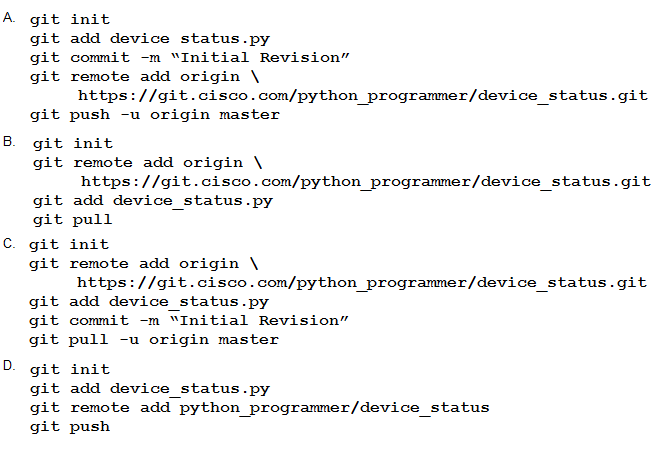
Suggested Answer: A
Get Premium 300-435 Questions
as Interactive Web-Based Practice Test or PDF
Real Exam Format
Detailed Explanations
Instant Access
Get Your Practice Test
35 comments · newest first
LE
Lelia
11 months ago
Not sure about that, seems too simple!
KA
Karon
11 months ago
I think Option A is the best choice.
YA
Yasuko
11 months ago
Wait, is the file name really ''device_status.py''?
TH
Therese
11 months ago
Option B looks right to me!
KA
Kallie
12 months ago
You need to initialize the repo first.
LE
Leonor
12 months ago
I feel like the order of commands is crucial here, but I can't remember if we need to set the remote origin before or after adding the file.
AN
Annett
1 year ago
This reminds me of a practice question where we had to push changes to a remote repo. I hope I remember the right sequence!
MI
Mireya
1 year ago
I remember something about using `git add` to stage files, but I can't recall if we need to commit right after that.
KI
Kimbery
1 year ago
I think we need to initialize the Git repository first, but I'm not sure about the exact commands.
OL
Oliva
1 year ago
Wait, the question says the repository is already created using the 'python_programmer' account. So I don't need to create a new one from scratch. I'll just need to navigate to the existing repository, add the 'device_status.py' file, and commit the changes. Gotta read the details carefully here.
LA
Lavonne
1 year ago
Alright, I've got this. First, I'll create the new repository using the 'git init' command. Then I'll add the 'device_status.py' file with 'git add'. Finally, I'll commit the changes with 'git commit'. I think that should do it!
HE
Helene
1 year ago
Hmm, okay, let me think this through. I'll need to create a new Git repository, add the 'device_status.py' file, and then commit the changes. But I'm not sure about the specific commands to use. I'll have to review my Git notes to make sure I get this right.
JU
Justine
1 year ago
This looks like a straightforward Git question. I'll start by reviewing the requirements - a new project called 'device_status' needs to be stored in a Git repository with the same name, and the first file should be 'device_status.py'. The repository is created using the 'python_programmer' account.
PO
Portia
1 year ago
Okay, I've got a plan. I'll use the Legacy Wrapper pattern to separate the database, legacy system, and file folder components into their own utility services. Then I'll apply the Service Facade pattern to manage the interactions between the main service and the utility services. Should be straightforward enough.
BA
Barbra
1 year ago
I'm going to have to go with Option D. It's the only one that includes the account details, and I don't want to get in trouble for using the wrong account. Safety first, that's my motto!
SH
Shaunna
1 year ago
Definitely safest to choose Option D to avoid any issues with the account.
TA
Tambra
1 year ago
I agree, Option D includes the account details for python_programmer.
RO
Rory
1 year ago
Option D is the way to go. Can't risk using the wrong account.
SO
Sommer
1 year ago
Option B is the clear winner here. Anything that involves less typing is a win in my book. Git can be such a hassle sometimes, you know?
CO
Colene
1 year ago
Hmm, Option C is tempting, but I think Option A is the way to go. Nice and concise, gets the job done. Plus, who doesn't love a good 'git init' command?
IS
Isabella
1 year ago
I see your point, but I still prefer Option A for its simplicity.
AN
Annice
1 year ago
I think Option B might be better, it includes more steps for clarity.
DE
Delmy
1 year ago
User 3: Option A it is then, let's go with that.
AN
Anjelica
1 year ago
I agree, Option A is simple and straightforward.
MA
Mabel
1 year ago
User 2: Yeah, 'git init' is always a good start.
VE
Veta
1 year ago
User 1: I agree, Option A is simple and effective.
AR
Aracelis
1 year ago
I'm going to have to go with Option D. It includes the project name, the file name, and the account details, which seems like the complete set of instructions needed.
DI
Dino
2 years ago
Option B looks the most straightforward to me. Creating the repository, navigating to the project directory, and then committing the file - that's the typical workflow for a new Git project.
CA
Casandra
1 year ago
User4: Option B definitely seems like the most logical choice for inserting the project into Git.
VI
Viva
1 year ago
User3: I think Option B is the way to go, it follows the typical workflow for starting a new Git project.
KI
Kimberely
1 year ago
User2: Yeah, Option B looks like the most straightforward approach for creating the repository and committing the file.
RA
Raylene
2 years ago
User1: I agree, Option B seems like the best choice for inserting the project into Git.
PA
Patrick
2 years ago
Why do you think Option B is correct?
LA
Latonia
2 years ago
I disagree, I believe Option B is the right choice.
PA
Patrick
2 years ago
I think the correct answer is Option A.