Deal of The Day! Hurry Up, Grab the Special Discount - Save 25% - Ends In 00:00:00 Coupon code: SAVE25
Welcome to Pass4Success

- Free Preparation Discussions

Cisco 200-301 Exam - Topic 6 Question 50 Discussion

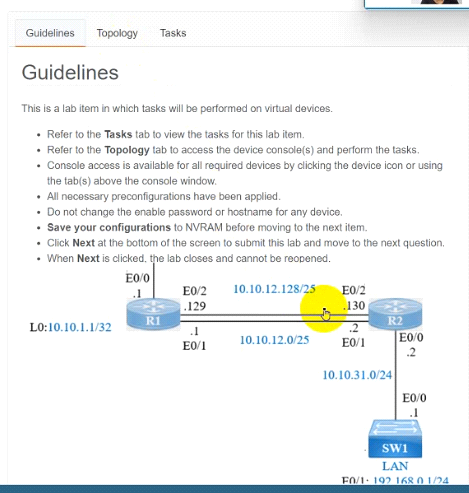
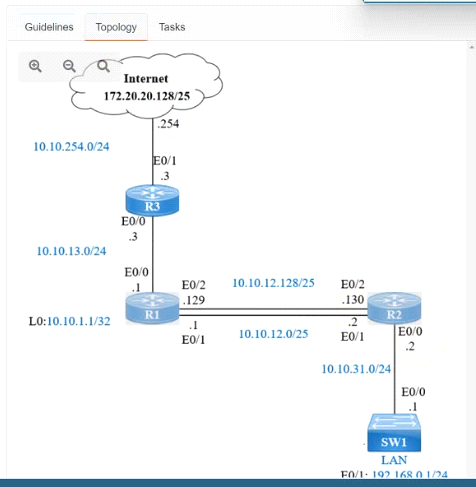
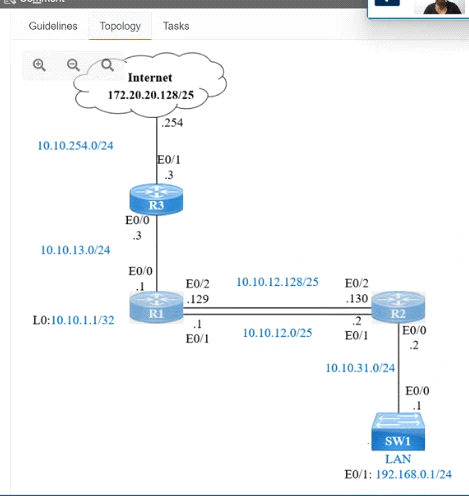
Refer to the exhibit.IP connectivity and OSPF are preconfigured on all devices where necessary. Do not make any changes to the IP addressing or OSPF. The company policy uses connected interfaces and next hops when configuring static routes except for load balancing or redundancy without floating static. Connectivity must be established between subnet 172.20.20.128/25 on the Internet and the LAN at 192.168.0.0/24 connected to SW1:1. Configure reachability to the switch SW1 LAN subnet in router R2.2. Configure default reachability to the Internet subnet in router R1.3. Configure a single static route in router R2 to reach to the Internet subnet considering both redundant links between routers R1 and R2. A default route is NOT allowed in router R2.4. Configure a static route in router R1 toward the switch SW1 LAN subnet where the primary link must be through Ethernet0/1. and the backup link must be through Ethernet0/2 using a floating route. Use the minimal administrative distance value when required.
A) Explanation: Answer as below configuration: On R2: Enable Conf t Ip route 192.168.1.0 255.255.255.0 10.10.31.1 On R1: Enable Conf t Ip route 0.0.0.0 0.0.0.0 10.10.13.3 On R2 Ip route 172.20.20.128 255.255.255.128 e0/2 Ip route 172.20.20.128 255.255.255.128 e0/1 On R1 Ip route 192.168.0.0 255.255.255.0 e0/1 Ip route 192.168.0.0 255.255.255.0 10.10.12.2 3 Save all configurations after every router from anyone of these command Do wr Or Copy run start

Cisco 200-301 Exam - Topic 6 Question 50 Discussion

Actual exam question for Cisco's 200-301 exam
Question #: 50
Topic #: 6
[All 200-301 Questions]

Refer to the exhibit.

IP connectivity and OSPF are preconfigured on all devices where necessary. Do not make any changes to the IP addressing or OSPF. The company policy uses connected interfaces and next hops when configuring static routes except for load balancing or redundancy without floating static. Connectivity must be established between subnet 172.20.20.128/25 on the Internet and the LAN at 192.168.0.0/24 connected to SW1:

1. Configure reachability to the switch SW1 LAN subnet in router R2.

2. Configure default reachability to the Internet subnet in router R1.

3. Configure a single static route in router R2 to reach to the Internet subnet considering both redundant links between routers R1 and R2. A default route is NOT allowed in router R2.

4. Configure a static route in router R1 toward the switch SW1 LAN subnet where the primary link must be through Ethernet0/1. and the backup link must be through Ethernet0/2 using a floating route. Use the minimal administrative distance value when required.

Show Suggested Answer Hide Answer
Suggested Answer: A

Contribute your Thoughts:

0/2000 characters
Shenika
10 months ago
The floating route on R1 is a smart move for redundancy.
upvoted 0 times
...
Tawna
10 months ago
Don't forget to save the configs after!
upvoted 0 times
...
Layla
10 months ago
Wait, why no default route on R2? Seems odd.
upvoted 0 times
...
Merlyn
11 months ago
Totally agree, that’s the right approach!
upvoted 0 times
...
Annice
11 months ago
R2 needs a static route to 192.168.0.0/24.
upvoted 0 times
...
Lucille
11 months ago
I recall that we shouldn't use a default route on R2, but I hope I remember the right syntax for the static routes!
upvoted 0 times
...
Kristel
11 months ago
I’m a bit confused about the subnetting part for R2. Is the next hop supposed to be the interface or the IP address?
upvoted 0 times
...
Deja
11 months ago
I practiced a similar question where I had to configure floating static routes, so I think I need to set the primary and backup links correctly on R1.
upvoted 0 times
...
Kristofer
11 months ago
I think I remember needing to set up static routes on both routers, but I'm not entirely sure about the specific commands for R2.
upvoted 0 times
...
Graciela
11 months ago
I'm confident the SDDC Manager integration and a SDDC Manager Cloud Account are the two correct answers. The other options don't seem directly relevant to the VMware Cloud Foundation solution.
upvoted 0 times
...

Save Cancel