
Deal of The Day! Hurry Up, Grab the Special Discount - Save 25% - Ends In 00:00:00 Coupon code: SAVE25
Welcome to Pass4Success

- Free Preparation Discussions

Cisco 100-140 Exam - Topic 6 Question 2 Discussion

Posted by Raelene on Jul 31, 2025 at 12:28 AM

John indicates that he cannot edit the file Test.docx, which is stored on a network shared drive. John can access and edit other files on the shared drive. You review permissions for the file and see the permissions shown in the following screenshot.
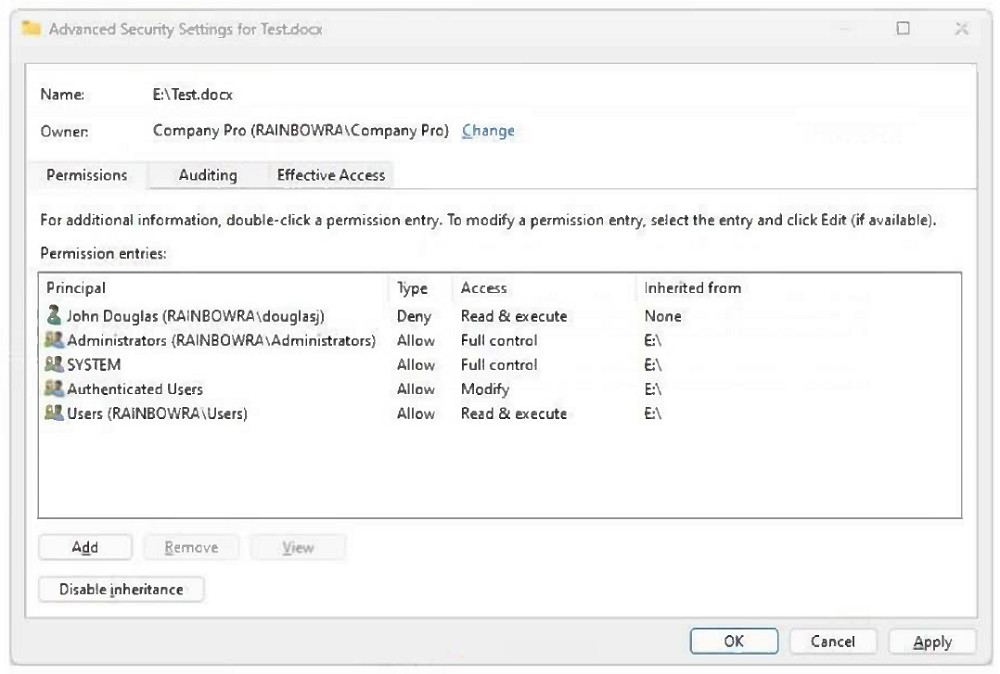
Which change will allow John to access and edit the Test.docx file, while retaining account-level control?

Suggested Answer: B

The screenshot shows that John Douglas is explicitly denied 'Read & execute' permissions on the file Test.docx, which overrides any inherited allow permissions. To allow John to edit the file, you must modify the NTFS permissions on the file and remove or change the Deny rule that applies to his account. Simply allowing 'read & execute' would not be enough; you must grant 'Modify' or higher and remove the Deny.


Get Premium 100-140 Questions as Interactive Web-Based Practice Test or PDF Real Exam Format Detailed Explanations Instant Access Get Your Practice Test
23 comments · newest first
MO
Moon 10 months ago
Just give him full control, simple as that!
HU
Hubert 10 months ago
Wait, why would moving the file help? Seems odd.
SE
Sean 10 months ago
Definitely option C, that should fix it!
BR
Brande 11 months ago
I disagree, modifying NTFS permissions won't solve this.
RI
Rikki 11 months ago
Looks like John needs full control on that file.
AV
Avery 11 months ago
I recall that modifying NTFS permissions is usually the right approach, but I’m not clear if telling John to do it himself is the best option.
LO
Loreta 11 months ago
I feel like giving John full control through share permissions could work, but I’m a bit confused about how that interacts with NTFS permissions.
AN
Angella 12 months ago
I think moving the file might not solve the issue since it seems to be a permissions problem. I practiced a similar question where permissions were the key factor.
CH
Chantay 12 months ago
I remember something about NTFS permissions being crucial for file access, but I'm not sure if just modifying them to read & execute would help John edit the file.
SH
Shelba 1 year ago
I think the answer is to modify the share permissions on the file to give John full control. That should do the trick without having to make any changes to the NTFS permissions.
AL
Alba 1 year ago
I'm a bit confused by the different permission options. I'll need to make sure I understand the differences between NTFS and share permissions before deciding on the right approach.
LI
Lizbeth 1 year ago
Okay, let's think this through step-by-step. The key is to find a solution that allows John to edit the file while maintaining account-level control.
LA
Larue 1 year ago
Hmm, this seems like a tricky one. I'll need to carefully review the permissions shown in the screenshot to determine the best approach.
TO
Tonette 1 year ago
Hmm, I'm not sure. Wouldn't option B, modifying the NTFS permissions, be the better choice? That way, it's more secure than just giving full control through the share permissions.
MA
Matt 9 months ago
↳ replying to Tonette
Option B seems safer. Less risk with NTFS permissions.
RO
Rosalia 10 months ago
↳ replying to Tonette
I agree with Adelle. John needs to edit the file easily.
ST
Stefanie 10 months ago
↳ replying to Tonette
But isn't that risky? What if someone else messes with it?
AD
Adelle 11 months ago
↳ replying to Tonette
I think option C is the way to go. Full control is necessary for editing.
AL
Allene 1 year ago
I agree with Rory, C seems like the best option.
BA
Barbra 1 year ago
I think the answer is C. Modifying the share permissions to give John full control is the most straightforward way to let him access and edit the file without affecting the account-level control.
OC
Octavio 1 year ago
I think B might be the correct answer.
TH
Theron 1 year ago
I disagree, I believe the answer is D.
RO
Rory 1 year ago
I think the answer is C.
0/2000 characters

Save Cancel