
Free Preparation Discussions
 MENU
MENU
Blue Prism AD01 Exam - Topic 1 Question 107 Discussion
Topic #: 1
Examine the following diagram which has been extracted from a Blue Prism Process currently being tested in Process Studio:
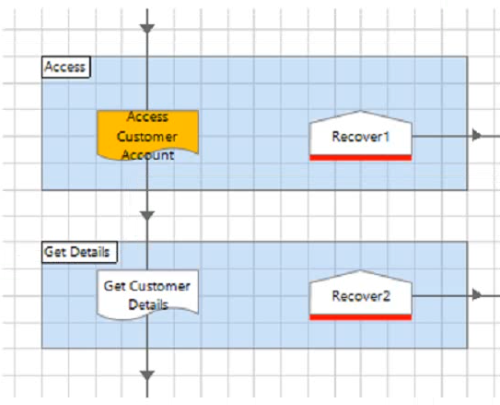
The 'Access Customer Account* sub-page contains no Breakpoints, however the page does contain an error.
What will happen if you choose to Step Over (F10) when debugging the Process?
Understanding the Diagram and Process Flow:
The process includes a sub-page called 'Access Customer Account', which contains an error.
When debugging, choosing to 'Step Over' (F10) will execute the sub-page without stepping into each individual stage within it.
Exception Handling in Blue Prism:
If an error occurs within the 'Access Customer Account' sub-page, the process will throw an exception.
The process will then move to the appropriate Recover stage to handle the exception.
Recover Stage Focus:
Option A: Incorrect. Focus will not move directly to the stage containing the error within the sub-page.
Option B: Incorrect. The process does not move to the internal recover stage of the sub-page if there are no breakpoints.
Option C: Correct. The process will move to the 'Recover1' stage after the exception is thrown, as it is the appropriate recover stage for handling the error.
Option D: Incorrect. Focus will not move to the 'Get Customer Details' stage, as the exception handling logic will direct it to 'Recover1'.
Conclusion:
The correct answer is C. The process will work all stages in the 'Access Customer Account' page until the exception is thrown, and then focus will move to the 'Recover1' stage.
Blue Prism Developer Documentation: Exception Handling and Recovery Stages
Blue Prism Training Material on Debugging and Exception Management
Brittni
1 month ago