
Free Preparation Discussions
 MENU
MENU
Adobe AD0-E911 Exam Questions
- Topic 1: Intake and Planning: Covers how work requests are received, reviewed, and planned in Workfront, including task settings, permissions, project hierarchy, risk tracking, and relevant reporting during the planning phase.
- Topic 2: Execute: Covers the active management of projects in Workfront, including milestones, approvals, resource assignment, financial tracking, team communication, proofing, Gantt charts, and custom reporting during project execution.
- Topic 3: Closeout: Covers the actions and evaluations required when closing a project, including object status triggers and measuring overall project success.
Free Adobe AD0-E911 Exam Actual Questions
Note: Premium Questions for AD0-E911 were last updated On Sep. 24, 2026 (see below)
Refer to the exhibit.
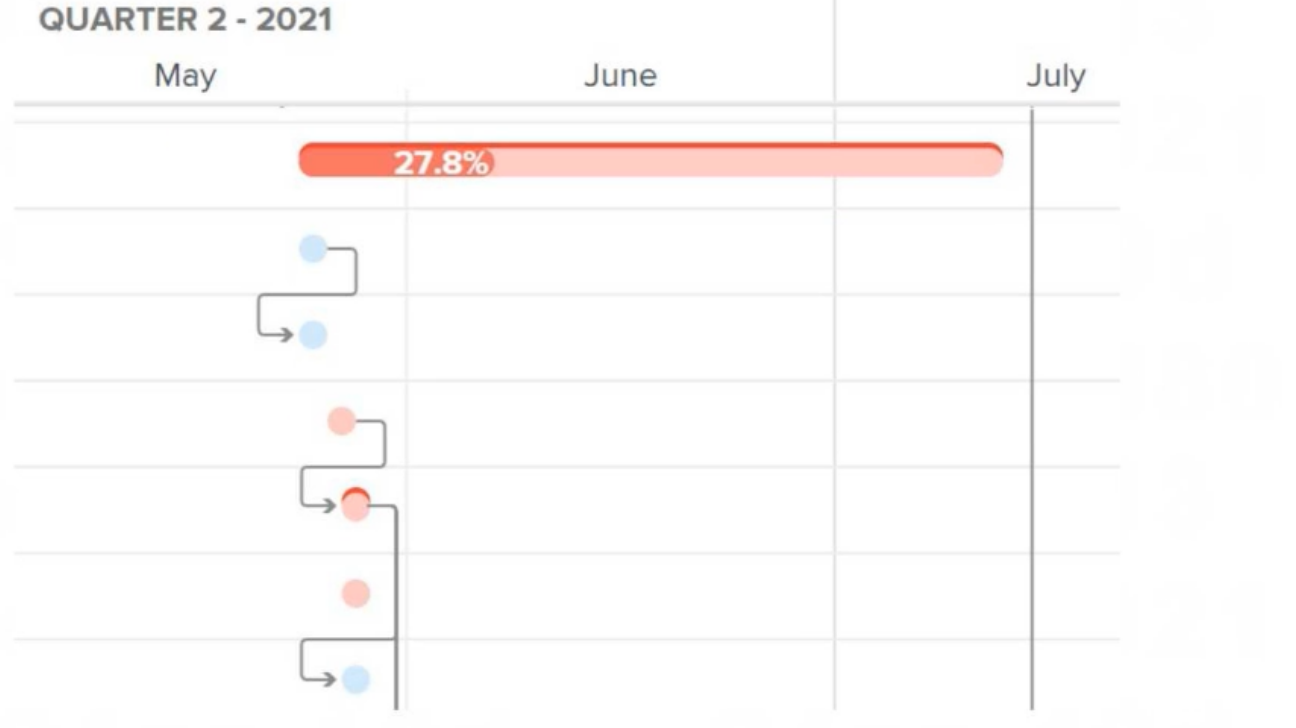
Identified in red on a Gantt chart, what are the tasks called whose changes may affect the overall timeline of a project?
In Adobe Workfront, and in general project management, the Critical Path refers to the sequence of tasks that directly impacts the project's overall timeline. Tasks on the critical path are marked in red on a Gantt chart to indicate that any delay or change to these tasks will affect the entire project's completion date. These tasks are essential for maintaining the project schedule and ensuring timely delivery. Baselines are used for comparison against the current progress, and Milestones mark significant checkpoints but do not necessarily affect the project timeline if they are delayed.
Top of Form
Bottom of Form
What is unique to a Scrum iteration?
A Burndown Chart is a visual representation of work remaining versus time in a Scrum iteration. It is unique to agile methodologies like Scrum and is used to track the team's progress during a sprint. The chart helps teams visualize how much work is left to complete the sprint goal, making it a critical tool in Scrum.
Which two statements are true about Groups and Teams? (Choose two.)
In Workfront, Teams are operational entities that can be assigned to tasks, while Groups are organizational entities that are not assignable to tasks. Additionally, work requests can be routed to both Groups and Teams, depending on how the organization is structured and how the routing is set up.
The last 5 tasks in a project need to happen within 10 days of the end of the project.
Which Task Constraint should the project manager use to configure this timeline without setting specific dates?
In Workfront, the 'As Late As Possible' task constraint ensures that tasks are scheduled as close to the project's end date as possible. This is useful when specific start dates are not necessary, but tasks need to happen near the end of the project timeline. This constraint allows for flexibility while still ensuring that the tasks are completed within the required time frame.
A team lead wants to see all hours that have been logged this month by members of the team lead's home team, organized by project. How should the team lead create this view?
The team lead should create a report in the Reports area to see all hours logged by the home team during the current month. By using filters for Home Team ID and Entry Date, and grouping the results by Project Name, the team lead can view hours logged in a project-based format for the entire home team during the selected time period.
- Select Question Types you want
- Set your Desired Pass Percentage
- Allocate Time (Hours : Minutes)
- Create Multiple Practice tests with Limited Questions
- Customer Support
Dorothy Hill
14 days agoJames Lewis
17 days agoRobert Hall
29 days agoCarol Davis
1 month agoTiffany Lopez
2 months agoDaniel Stewart
2 months agoMark Baker
3 months agoJeffrey Lewis
3 months agoDorothy Baker
3 months agoJason Lewis
4 months agoNathan Cook
4 months agoJessica Lee
4 months agoEdward Nguyen
5 months agoRonald Wilson
5 months ago