
Free Preparation Discussions
 MENU
MENU
Adobe AD0-E123 Exam Questions
- Topic 1: Configurations: This topic evaluates proficiency in setting up and managing AEM environments. Candidates must understand Dispatcher configurations, multi-site setups, OSGi configurations, Oak indices, and SAML/IMS integrations. Mastery of these areas ensures effective site performance and seamless integration, critical for AEM Developers and Software Engineers.
- Topic 2: AEM Development: Here, the focus is on implementing core-based components, integrating HTL, models, and services, developing workflows, and utilizing content or experience fragments. This topic of the AD0-E123 exam is essential for Front End Developers and AEM Developers to build and enhance AEM functionalities.
- Topic 3: Build and Deployment: This topic of the Adobe Experience Manager Sites Developer Professional exam covers the essentials of project structuring and configuration using Maven and archetypes. It assesses the ability to set up projects effectively, which is crucial for Software Engineers involved in building and deploying AEM solutions.
- Topic 4: Environment Maintenance: Adobe AEM Developers must demonstrate skills in debugging issues in AEM environments, understanding maintenance releases, configuring AEM topologies, and planning migrations to AEM as a Cloud Service. This topic of the AD0-E123 exam is designed to test the ability to maintain and troubleshoot AEM environments, essential for developers managing complex setups.
Free Adobe AD0-E123 Exam Actual Questions
Note: Premium Questions for AD0-E123 were last updated On Sep. 05, 2026 (see below)
A developer wants to send a SAML Authentication Request to a specific URL of a system entity that creates, maintains, and manages identity information.
Which property of SAML Authentication Handler configuration must be configured with this URL?
Within the SAML (Security Assertion Markup Language) Authentication Handler configuration in AEM, the property that must be configured with the URL of a system entity that manages identity information is the Identity Provider URL. The Identity Provider (IdP) is a core component of the SAML specification that is responsible for issuing authentication assertions and managing user identity information. Configuring the Identity Provider URL in the SAML Authentication Handler ensures that the authentication requests are directed correctly to the IdP.
A developer has to enable the indexing of multiple properties asynchronously. Which type of index would the developer use?
In AEM, Lucene is often used for indexing due to its powerful full-text search capabilities, and it also supports asynchronous indexing. Asynchronous indexing allows the system to handle other tasks while indexing is being processed in the background, which can improve performance and scalability. This is especially useful when multiple properties need to be indexed without impacting the immediate response times of the system. Therefore, when a developer needs to enable the indexing of multiple properties asynchronously, a Lucene index is the most suitable choice.
Given this configuration property:
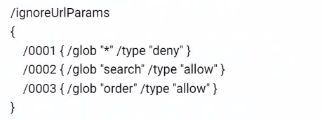
Which page will be cached on the dispatcher?
Given the dispatcher configuration snippet provided in the image, we can understand the URL patterns that will be ignored (not cached) by the dispatcher. The configuration under /ignoreUrlParams shows patterns to match query parameters in the URLs:
/0001 { /glob '*' /type 'deny' } means that by default, all query parameters are ignored (not cached).
/0002 { /glob 'search' /type 'allow' } specifically allows caching for URLs with the 'search' parameter.
/0003 { /glob 'order' /type 'allow' } specifically allows caching for URLs with the 'order' parameter.
Based on this, let's evaluate the options:
A) /myproduct/myrecipe.html?search=searchparam --- This URL will not be cached because the 'search' parameter is allowed, but the actual value 'searchparam' does not match any allow pattern. B) /myproduct/myrecipe.html?search=s&order=asc&brand=ad --- This URL will not be cached because although 'search' and 'order' parameters are allowed, the 'brand' parameter is not allowed according to the configuration. C. /myproduct/myrecipe.html?brand=mybrand --- This URL will be cached because there are no allowed parameters, so the default deny does not apply, and the page can be cached without considering the 'brand' parameter.
Therefore, the page that will be cached on the dispatcher is the one in option C, as it does not contain any of the explicitly allowed query parameters ('search' or 'order'), and all other parameters are ignored by default.
A developer needs to use the AEM Core Components. What is the recommended way to complete this task?
The recommended approach to use AEM Core Components is by creating proxy components. Proxy components are essentially wrapper components within your own project that reference the core components. This practice allows developers to inherit functionality from the core components while being able to override and extend it as necessary. By using proxy components, developers can ensure that any custom styles and configurations are preserved even when the core components are updated in the future.
Which two options are included in the AEM service pack release notes? (Choose two.)
AEM service pack release notes typically include information that helps users understand the changes that the service pack will bring to their AEM instance. These release notes commonly include:
A) Deprecated features - This section informs users about the features that are being deprecated with the current release and guides them on migrating away from deprecated features to the recommended alternatives.
B) Known issues - This section provides information about any issues or bugs that are known at the time of the release, which might not yet be fixed. It often includes workarounds for these issues if they are available.
Option C, 'Next service pack release date,' is not typically included because release dates are subject to change and are usually communicated through official channels closer to the actual release.
Option D, 'Download link to AEM jar,' is not included in the release notes but is typically available through the Adobe Software Distribution site or Cloud Manager for AEM as a Cloud Service.
- Select Question Types you want
- Set your Desired Pass Percentage
- Allocate Time (Hours : Minutes)
- Create Multiple Practice tests with Limited Questions
- Customer Support
Joseph Brown
10 days agoJohn Rivera
22 days agoTimothy Nguyen
1 month agoRebecca Morgan
2 months agoKimberly Perez
2 months agoSteven Anderson
3 months agoLisa Williams
3 months agoHarold Hill
4 months agoBrian Wilson
4 months agoStephen Roberts
5 months agoBrian Nguyen
4 months agoRachel Campbell
4 months agoJames Torres
4 months agoHarold Walker
4 months agoMargaret Perez
4 months agoMicaela
5 months agoEmily
6 months agoLeonie
6 months agoJacinta
6 months agoGladys
6 months agoRyann
7 months agoCarri
7 months agoEttie
7 months agoCeleste
7 months agoJaclyn
8 months agoFelix
8 months agoLemuel
8 months agoClorinda
8 months agoCasie
9 months agoGwenn
9 months agoLezlie
9 months agoLeanna
9 months agoMarquetta
10 months agoTora
10 months agoCarrol
10 months agoAnnice
10 months agoMarcelle
11 months agoBrent
11 months agoCathern
11 months agoBarrett
11 months agoJenelle
12 months agoMagda
1 year agoSteffanie
1 year agoKanisha
1 year agoMitzie
1 year agoCoral
1 year agoAntonio
1 year agoLynna
2 years agoOlga
2 years agoLynsey
2 years agoKeva
2 years agoFelicidad
2 years agoHillary
2 years agoRichelle
2 years agoQuentin
2 years agoLarae
2 years agoLenna
2 years agoTheodora
2 years agoLeana
2 years agoTammi
2 years agoLaurel
2 years agoGilberto
2 years agoJacqueline
2 years agoHui
2 years agoAnnelle
2 years agoCarolann
2 years agoReta
2 years agoJill
2 years agoStevie
2 years agoLyda
2 years ago